


自迁移出 MediaWiki 以来,本页内容尚未经过审查。如果您愿意帮忙,请查看帮助指南!
|
|
|
| 文件 |
SPIM_Registration.jar |
| 类别 |
SPIM Registration |
重要提示
请注意:此版本的软件已过时。将暂时成为斐济的一部分,但我强烈建议使用新的Multiview Reconstruction Plugin。它更加强大、灵活并且与BigDataViewer.集成
引文
请注意,斐济提供的 SPIM 注册插件基于书籍。如果您成功将其用于您的研究,请引用我们的工作:
- S.普雷比什、S.萨尔菲尔德、J. Schindelin 和 P. Tomancak (2010)“用于流动平面照明工作站数据的基于珠的配准的软件”,《自然方法》,7(6):418-419。 Webpage PDF Supplement
有关基于珠子的配准方法和SPIM理论的技术详细信息,请参阅SPIM Registration Method。
* 已弃用* SPIM 基于珠子的注册插件概述
SPIM 注册插件从多个输入图像(称为视图)重建图像。对于此重建过程,需要一些定义输入和输出的参数。用户必须定义输入图像的命名规定、估计的珠亮度以及创建输出融合图像的策略。
创建后期的输出图像
由于图像输出通常非常大(所有注册视图周围的边界框),强烈建议定义一个精确区域,其中分析样本位于输出图像中。由于这在第一次运行中是不可能的图像,因此可以选择首先创建输出的下采样版本,从而提取部分区域。通过运行插件之前加载并加载的配准参数,可以有效地创建之后的全解析图像输出。
下载示例数据集
有一个 果蝇 的 7 角度 SPIM 数据集可用 here。插件中预先设置的具体参数适合此数据集,只需定义适当的文件夹。
系统要求
多视图 SPIM 数据集通常相当大,因此建议在具有大量 RAM 的上使用注册插件。示例数据集的最低要求是 ** 至少 4Gb** 内存,但我们建议使用 8Gb 系统。您可能需要通过转到Plugins › Image5D › Virtual Image 5D Opener来增加 Fiji 内存限制。
使用插件
有三个插件以不同的方式获取这些输入参数:
- SPIM Registration:允许使用图形用户界面中显示必要的选项子集注册 SPIM 数据
- Multi-Channel SPIM Registration:将SPIM Registration分支多个通道,并允许覆盖输入文件中保存的z轴。
- Advanced SPIM Registration:通过加载配置文件使用所有可能的选项注册 SPIM 数据
处理延迟
处理延迟加速需要两个步骤。在第一步中,必须计算每个单独点的注册并自动存储。因此,在第一遍中,在要处理的点中输入应处理的点(如1-100),选中仅注册时间(无)并取消选中延迟融合。执行准配后,必须选择一个时间点作为参考点,是配准时间较低的时间点。通常应融合此时间点correct cropping area ,另外将评定所有其他时间点。
注册再次单独的时间点并定义修剪区域后,必须调用插件。这次勾选延迟注册,插入参考时间点,取消选中注册(不融合图像)并插入参考时间点的修剪区域坐标。例如,只能使用Edit › Options › Memory & Threads1查看创建的输出。
已弃用 基于SPIM 珠的注册
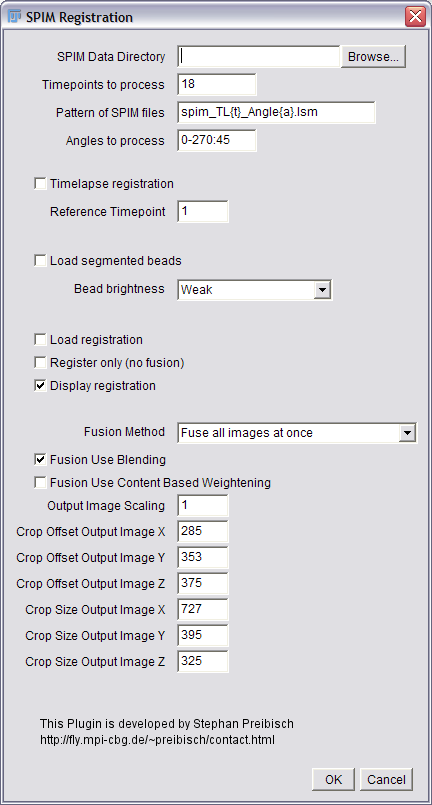 Shows the SPIM Registration Dialog.
- SPIM数据目录:包含填写所有图像文件的目录名称。您可以拖放目录、浏览目录或直接键入名称。
- 要处理的时间点:定义应处理的时间点。您可以给出单个数字(例如 18)、枚举(例如 1、18、19、100)、定义范围(例如 1-18)或将所有数字组合成所需的任何组合(例如 1、2、10、20-50)。
- SPIM 文件的模式:通过解释如何将角度和时间点编码到文件名中来定义输入文件的命名约定。例如,文件名按以下方式命名
spim_tl1_angle0.lsm, spim_tl1_angle45.lsm … spim_tl1_angle270.lsm
spim_tl2_angle0.lsm, … spim_tl2_angle270.lsm
spim_tl100_angle0.lsm, … spim_tl100_angle270.lsm.
That means the pattern of the file names corresponds to spim_tl{t}_angle{a}.lsm, where {t} is replaced with the current timepoint and {a} with the current angle. If the numbers contain leading zeros (e.g. 000, 045, 090, 135 instead of 0, 45, 90, 135), this can be encoded by simply adding more letters to the placeholder, in this case {aaa}.
- 要处理的角度:定义应处理的角度(至少 2 个)(针对每个时间点,如果适用)。您可以枚举角度(例如 0、90、180、270),以步长定义范围(例如 0-270:45,这意味着以 45 为步长使用角度 0 到 270,即 0、45、90、135、180、225、270)或以所需的任何组合组合所有角度(例如 0、 45、180-270:45)。
- 延时处理:检查是否应执行延时处理。在这种情况下,预先注册的时间点被重新注册到一个参考时间点,从而产生对齐的时间序列。
- 参考时间点:如果勾选了上述延时处理,则定义延时处理的参考时间点。
- 加载分段的珠子:如果多次执行时间点的注册(重新计算注册),则可以加载珠子的初始分段以加快处理速度。注意:如果选中了加载配准,则也会隐式选中加载分段珠子。
- 珠子亮度:定义所用珠子相对于样品的亮度。
- 加载配准:如果多次执行时间点配准(为了定义正确的裁剪区域或执行延时处理),则可以加载珠子的初始分割和视图的最终仿射矩阵以加快处理速度。注意:如果选中加载配准,则也会隐式选中加载分段珠子,并且显示配准将被忽略。
- 仅注册(不融合):检查是否不应执行数据融合。
- 显示注册:这将显示一个交互式窗口,可视化全局优化过程。

This slows down the optimization.
</div> </div>
- 融合方法:共有三个选项可用。
Fuse all images at once loads all the input images and computes the output image. This is the fastest method but it also needs significant amounts of RAM.
Fuse images sequentially loads one input image after the other and computes the contribution sequentially. This is significantly slower but typically uses less RAM. However, this methods needs to allocate the output image twice during the fusion process as it needs to store image content and weights separatetly.
Create independent registered images is a special output option where each view is transformed into a compatible bounding box and written as a separate file for further processing.
- 融合使用混合:检查是否应在重叠视图的边缘应用混合;这消除了重叠图像相交的超平面处的亮度差异。
If neither Blending nor Content based Weightening is selected, only averaging is performed for fusion.
</div> </div>
- 融合使用基于内容的加权:检查是否应使用基于内容的加权;这通过其局部信息内容对每个视图的每个像素进行加权,从而增加了输出图像的对比度。
The content based weightening is rather fast but consumes a lot of RAM. If neither Blending nor Content based Weightening is selected, only averaging is performed for fusion.
</div> </div>
- 输出图像缩放:该因子定义输出图像的下采样,例如2 意味着输出图像的每个维度大小将减半,因此所需的 RAM 比全分辨率输出图像少 8 倍。如果成像样本周围的边界框(如下定义)未知且必须确定,则这尤其有用。
- 裁剪偏移输出图像 X/Y/Z:定义输出图像相对于未裁剪图像的 x/y/z 维度的裁剪偏移。值为 0 表示不裁剪。
all the values are relative to the downsampling factor in Output Image Scaling.
</div> </div>
- 裁剪尺寸输出图像 X/Y/Z:定义输出图像相对于未裁剪图像的 x/y/z 维度的裁剪尺寸。值为 0 表示不裁剪。
all the values are relative to the downsampling factor in Output Image Scaling.
</div> </div>
插件愿望清单
当您发现一些想要添加到插件中的功能时,请在这里写下来
- 更改插件中的 Z 拉伸
- 自动延迟摄影处理
- 如果仅选中注册且有多个时间点,则预览(例如第一个角度的最大投影)
多渠道 SPIM 注册
多通道SPIM注册通过注册多个通道和覆盖文件中存储的分辨率(xy、z)的能力扩展了正常注册。因此有两个新选项可用
- 要处理的通道:定义要处理的通道。您可以给出单个数字(如0)、枚举(如1、2)、定义范围(如1-3)或将所有数字组合成需要的任何组合(如1,3-4)。
- 覆盖文件尺寸:选中此框可覆盖输入文件中存储的轴向和横向分辨率。
- xy 分辨率 (um/px):以每像素 um 为单位定义 xy 分辨率,请注意,仅使用 xy 和 z 分辨率之间的比率。
- z 分辨率 (um/px):以每像素 um 为单位定义 z 分辨率,请注意,仅使用 xy 和 z 分辨率之间的比率。
高级 SPIM 注册
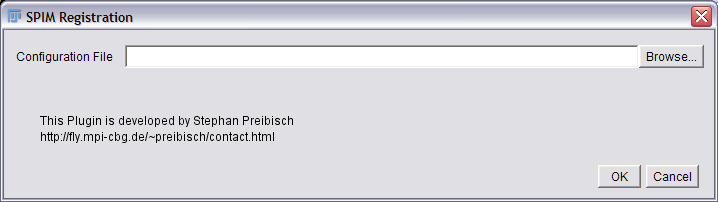 Shows the Advanced SPIM Registration Dialog.
对于高级 SPIM 注册,可以使用两个配置文件(configuration.txt 和 VariablesAssignment.txt,见下文)调整所有可用参数。请联系作者了解更多详情2。
###配置.txt ### Configuration file for SPIM Registration ### —————————————- ### ### The first line is the filename for the linkage from the entries in this file to the ### variable names in java. It is very important and you only need to change this ### if you change the source code. ### ### The rest of the file is divided into sections where you can change different ### types of parameters. Really important is the Input files section. Change it ### according to your experiment data.
<VariablesAssignment.txt>

###
### Section: General Parameters
###

Time Point Pattern = "18"
Acquisition Angle Pattern = "0-270:45"
# The input files can be in any format that Fiji can read.
# They need to be 3D stacks with correct calibration, though.
Input File Pattern = "spim_TL{t}_Angle{a}.lsm"
Input Directory = "F:\Stephan\dros\"
Output Directory = "F:\Stephan\dros\output"
Registration File Directory = "F:\Stephan\dros\registration\"
Debug Level = "DEBUG_MAIN"
Show ImageJ Window = true

###
### Section: Time Lapse
###

Time Lapse Registration = false
Reference Time Point = 1

###
### Section: Data Structures, Access and Paging
###

Factory for Images during Segmentation = ArrayContainerFactory()
Factory for Recursive Gauss = ArrayContainerFactory()
Factory for Images during Fusion = ArrayContainerFactory()
#Factory for Output Images = ArrayContainerFactory()
Factory for Entropy = ArrayContainerFactory()
Factory for Scale Space = ArrayContainerFactory()

#Factory for Images during Segmentation = CubeContainerFactory(16)
#Factory for Recursive Gauss = CubeContainerFactory(16)
#Factory for Images during Fusion = CubeContainerFactory(16)
Factory for Output Images = CubeContainerFactory( 256 )
#Factory for Entropy = CubeContainerFactory(16)
#Factory for Scale Space = CubeContainerFactory(35)

Paging Temporary Directory = null

Out of Bounds Strategy for Fusion = OutsideStrategyValueFactory(0)
Out of Bounds Strategy for Gauss = OutsideStrategyMirrorFactory()
Interpolator for Output Image = LinearInterpolatorFactory()

###
### Section: Main Switches
###

Write Output Image = true
Show Output Image = true
Segmentation Use Scale Space = true
Fusion Use Entropy = false
Fusion Use Gauss = false
Fusion Use Blending = false

Fuse all Images at once = false
Fuse Images sequentially = false
Number of Paralell Views = 4
Create multiple registered Output Images = true

Register Only = false
Display Registration = false
Read Segmentation = true
Write Segmentation = true
Read Registration = false
Write Registration = true

###
### Section: Image Parameters
###

Override Z-Stretching of Image = true

# 20x, 2um z spacing ( 2.0 / 0.73 )
Image Z-Stretching = 2.739726027397260273972602739726

Image Background = 0

###
### Section: Threshold Bead Segmentation
###

Bead Segmentation Threshold = 0.9
Bead Segmentation Fixed Threshold = 0.02
Bead Segmentation Use Fixed Threshold = true
Bead Segmentation Circularity Factor = 0.5
Bead Segmentation Minimum Black Border around Bead = 1
Bead Segmentation Minimum Bead Size = 10
Bead Segmentation Maximum Bead Size = 13375
Bead Segmentation Use Center of Mass = false

###
### Section: Scale Space Bead Segmentation
###

Bead Scale Space Minimum Peak Value = 0.01
Bead Scale Space Minimum Initial Peak Value = 0.005
Bead Scale Space Identity Radius = 3.0
Bead Scale Space Maxima Tolerance = 0.01
Bead Scale Space Image Sigma = 0.5
Bead Scale Space Initial Sigma = 1.4
Bead Scale Space Steps per Octave = 4
Bead Scale Space Steps = 3
Bead Scale Space Number of Threads = 0

###
### Section: Point Descriptor and Global Optimization
###

Point Descriptor Difference Threshold = 50
Point Descriptor Ratio of Distance = 10
Point Descriptor Number of Neighbors = 3
Point Descriptor Use Associated Beads = false
Point Descriptor Use RANSAC = true

RANSAC Maximum Epsilon = 5
RANSAC Minimum Inlier Ratio = 0.1
RANSAC Number of Iterations = 1000

# p__ = ( 1 - r^n ) ^ k
# k = log(p__) / log ( 1 - r^n )

# p__ ... probability that ransac fails
# r   ... min inlier ratio
# n   ... minimal number of points needed to create model
# k   ... number of iterations

###
### Section: Output Image
###

Output Image Scale = 1

Output Image Crop Offset X = 0
Output Image Crop Offset Y = 0
Output Image Crop Offset Z = 0
Output Image Crop Size X = 0
Output Image Crop Size Y = 0
Output Image Crop Size Z = 0


Output Image Number of Threads = 0

###
### Section: Volume Injection
###

Volume Injection Sigma = 0.25
Volume Injection Cut Off Radius = 2

###
### Section: Entropy
###

Entropy Histogram Bins = 256
Entropy Window Size X = 25
Entropy Window Size Y = 25

###
### Section: Blending
###

Blending Alpha = 1.5

###
### Section: Gauss Fusion
###

Gauss Fusion Sigma 1 = 20
Gauss Fusion Sigma 2 = 40 ### 变量分配.txt
Input File Pattern = String inputFilePattern
Time Point Pattern = String timepointPattern
Acquisition Angle Pattern = String anglePattern
Input Directory = String inputdirectory
Output Directory = String outputdirectory
Registration File Directory = String registrationFiledirectory
Debug Level = String debugLevel
Show ImageJ Window = boolean showImageJWindow

Time Lapse Registration = boolean timeLapseRegistration
Reference Time Point = int referenceTimePoint

Factory for Images during Segmentation = ContainerFactory imageFactory
Factory for Recursive Gauss = ContainerFactory recursiveGaussFactory
Factory for Images during Fusion = ContainerFactory imageFactoryFusion
Factory for Output Images = ContainerFactory outputImageFactory
Factory for Entropy = ContainerFactory entropyFactory
Factory for Scale Space = ContainerFactory scaleSpaceFactory

Paging Temporary Directory = String tempDir

Out of Bounds Strategy for Fusion = OutsideStrategyFactory strategyFactoryOutput
Out of Bounds Strategy for Gauss = OutsideStrategyFactory strategyFactoryGauss
Interpolator for Output Image = InterpolatorFactory interpolatorFactorOutput

Write Output Image = boolean writeOutputImage
Show Output Image = boolean showOutputImage
Segmentation Use Scale Space = boolean useScaleSpace
Fusion Use Entropy = boolean useEntropy
Fusion Use Gauss = boolean useGauss
Fusion Use Blending = boolean useLinearBlening

Fuse all Images at once = boolean paralellFusion
Fuse Images sequentially = boolean sequentialFusion
Number of Paralell Views = int numParalellViews
Create multiple registered Output Images = boolean multipleImageFusion

Register Only = boolean registerOnly
Display Registration = boolean displayRegistration
Read Segmentation = boolean readSegmentation
Write Segmentation =  boolean writeSegmentation
Read Registration = boolean readRegistration
Write Registration = boolean writeRegistration

Override Z-Stretching of Image = boolean overrideImageZStretching
Image Z-Stretching = double zStretching
Image Background = int background

Bead Segmentation Threshold = float threshold
Bead Segmentation Fixed Threshold = float fixedThreshold
Bead Segmentation Use Fixed Threshold = boolean useFixedThreshold
Bead Segmentation Circularity Factor = double circularityFactor
Bead Segmentation Minimum Black Border around Bead = int minBlackBorder
Bead Segmentation Minimum Bead Size = int minSize
Bead Segmentation Maximum Bead Size = int maxSize
Bead Segmentation Use Center of Mass = boolean useCenterOfMass

Bead Scale Space Minimum Peak Value = float minPeakValue
Bead Scale Space Minimum Initial Peak Value = float minInitialPeakValue
Bead Scale Space Identity Radius = float identityRadius
Bead Scale Space Maxima Tolerance = float maximaTolerance
Bead Scale Space Image Sigma = float imageSigma
Bead Scale Space Initial Sigma = float initialSigma
Bead Scale Space Steps per Octave = int stepsPerOctave
Bead Scale Space Steps = int steps
Bead Scale Space Number of Threads = int scaleSpaceNumberOfThreads

Point Descriptor Difference Threshold = double differenceThreshold
Point Descriptor Ratio of Distance = double ratioOfDistance
Point Descriptor Number of Neighbors = int neighbors
Point Descriptor Use Associated Beads = boolean useAssociatedBeads
Point Descriptor Use RANSAC = boolean useRANSAC

RANSAC Maximum Epsilon = float max_epsilon
RANSAC Minimum Inlier Ratio = float min_inlier_ratio
RANSAC Number of Iterations = int numIterations

Output Image Scale = int scale
Output Image Crop Offset X = int cropOffsetX
Output Image Crop Offset Y = int cropOffsetY
Output Image Crop Offset Z = int cropOffsetZ
Output Image Crop Size X = int cropSizeX
Output Image Crop Size Y = int cropSizeY
Output Image Crop Size Z = int cropSizeZ
Output Image Number of Threads = int numberOfThreads

Volume Injection Sigma = float sigma
Volume Injection Cut Off Radius = int cutOffRadiusGauss

Entropy Histogram Bins = int histogramBins
Entropy Window Size X = int windowSizeX
Entropy Window Size Y = int windowSizeY

Blending Alpha = float alpha

Gauss Fusion Sigma 1 = float fusionSigma1
Gauss Fusion Sigma 2 = float fusionSigma2
