


This page describes how to review pages on this wiki, to ensure they look as good or better than they did on the old wiki. It was originally part of the “Great Wiki Launch” editing sprint of June 1-4, 2021, but the instructions remain useful for vetting pages that still have not been checked.
项目目标
- 修复现有 wiki 页面的内容和语法错误。
- 改进或扩展现有页面的内容, as time and interest allows.
- 标准化插件的类别。 (查看 list-of-extensions. It’s cleaner than before, but further suggestions for consolidation are still welcome!)
- 熟悉新维基,并提供反馈:
what works, what doesn’t, etc.
开始之前
请记住以下几点:
We are focusing on the content, not the
style. We must keep a clean separation between the actual
information and how it is presented. If you don’t like the way something looks,
that’s OK—but raise an issue in the chat room or
on GitHub.
Please do not hack in custom styles just to tweak things like an improper
margin or an ugly table. And don’t invent your own custom navigation or other
fancy web feature, just for one page or site section. If you feel something
should be fixed or enhanced, let’s do it for the whole site, so that all pages
reap the benefits. When in doubt, discuss in the
chat room or on the
Fiji gather.town island
on GitHub or
on the Image.sc Forum.
非常感谢您对我上面的咆哮! 🙏 希望您不要生气; 我们软件开发人员喜欢让事情井然有序,以便一切都井井有条 保持平稳运行。我知道这可能很烦人,但有无数 有利于一致性。
注意事项
在很多方面,这个新的 wiki 都比旧网站强大得多。 但是,您应该了解一些主要缺点:
-
每当对网站进行编辑时,都必须由 GitHub 重建。这个 需要几分钟的时间,因此您不会看到您的更改立即生效。 此外,某些类型的语法错误将破坏构建,导致 在错误得到纠正之前,整个站点不会更新。
-
GitHub在线编辑器中的预览选项卡对于健全性检查非常有用 您的编辑,但不能完全信任。它呈现大多数 Markdown 语法正确,但它不理解 Liquid 指令(即
{% include ... %}语法),并且存在边缘情况 混合 Markdown + HTML 在预览中与在实际中看起来不同 实际直播站点。如果您发现自己对此感到沮丧,那么 build the site locally 测试您的更改的方法 在提交它们之前,但它使用了一些命令行和一些 Git。 如果你对此不满意,那就保持简单,尽力而为, 并选择问题不太复杂的页面。您还可以关注 改进内容本身不仅仅是解决语法问题。 -
Markdown 表格不如 MediaWiki 表格强大。幸运的是,你 如果你确实需要一个超级漂亮的表格,可以混合在 HTML 中。但写表格 因为与 MediaWiki 语法相比,HTML 冗长且丑陋。目前,我们 与它共存;也许我们以后可以找到更好的解决方案。
4.这不是永久性的缺点,但要注意还有几页
尚未组织到适当的位置。任何页面
位于顶级 _pages 文件夹中_并且_以大写字母开头
仍然需要重命名并移动到正确的位置。参见问题 4
下面了解更多相关信息。
- 另一个临时问题是我们尚未 100% 完成介质修复
包括:
img、video和gallery。第img和video包括 已经相当不错了,但是他们对数字的处理(何时包装内容 带有<figure>标签,当没有时,以及它们的确切样式)仍然 需要一点工作。并且gallery仍然需要大量清理。 欢迎您使用任何媒体,但我们可能需要做一些 随着这些内容的发展,稍后会进行额外的清理。
需要考虑的问题
- 插件的官方类别应该是什么?此刻,人们
can tag whatever they want for the categories, and
it shows in the list of extensions.
Do you have opinions? Or know of any kind of community
standard we could use here? Start a conversation
in the chatroom oron the Image.sc Forum! /update-sites包含记录更新站点是什么以及如何更新的页面 use them, whereas/sitescontains pages describing individual update sites (like/peoplefor people,/orgsfor organizations,/softwarefor software packages,/libsfor software libraries). This naming is confusing; do you have any better ideas?
Resolution:/sites/*moved into/update-sites/(imagej/imagej.github.io@3c6c255d).-
/tutorials包含有关ImageJ的教程,但目前还没有 rated by level of experience. It would be nicer if we rated each tutorial something like: 1-introductory (e.g. learning the GUI), 2-intermediate (e.g. recording and tweaking ImageJ macros), 3-advanced (e.g. scripting with the Script Editor), 4-expert (e.g. programming plugins in Java).Would it make sense to divide the tutorials folder into subfolders in this manner? How should we name it?/tutorials/level1/through/tutorials/level4/? Better ideas? Maybe the scripting tutorials in/scripting/examplesshould move into/tutorials/level3if we do this scheme? And maybe some things currently in/learncould move to/tutorials/level1then?Or would it better to make the existing folder structure contain tutorials at each level:/learnfor level 1,/scriptingfor levels 2 and 3, and/developfor level 4? That’s mostly how it is now, except we then also have articles the/tutorialsfolder… should we parcel out what’s there into the other locations instead?
Now that I’ve written all this out, I’m liking the latter approach, but please think it over and discuss!
Resolution:/scripting/examples/*was moved to/tutorials/(imagej/imagej.github.io@11595491), and all tutorials are now listed on/tuturials/index(imagej/imagej.github.io@d942e84b). We should still consider adding a rating system for tutorials (imagej/imagej.github.io#162). 根目录下11个尚未重命名的页面是:Command_Line_Tips_and_TricksDiadem_Challenge_DataFind_Maxima…Finer_Grained_Debian_PackagesFirst-instar_brain_6.3MBImageJ1-ImageJ2_cheat_sheetImprintJava_OptionsJava_Tricks_and_QuirksLinux_command_line_tutorialMamed
Where should each one go? Please propose locations for them in the chat.
Resolution: All of these pages are now located appropriately! 5.【Road to Production】项目有没有卡 board](https://github.com/imagej/imagej.github.io/projects/2) in the “To do - crowdsource!” column that interest you? If so, please feel warmly invited to work on them!
Resolution: The “Road to Production” board is now complete and closed! But you are still welcome to browse the issue tracker for issues of interest to work on!设置
- 唯一的技术要求是你有一个 GitHub 帐户。 This is the account you will use to make edits. If you don’t have an account yet, create one! If you don’t know how to use Git, don’t worry—you don’t need it to make edits to this wiki. (Although if you do know Git, you might want to check out the Advanced editing guide to clone the wiki repository and make changes locally; it’s a very powerful way to work!)
- 拥有 GitHub 帐户后,请执行以下操作:
Open the first page of the sign-up sheet and make sure your GitHub ID is listed next to your name in the first column.Open the chat room in a browser tab, and sign in with your GitHub account.- If you don’t already have write access to the wiki, post a message
in the chat roomon the Image.sc Forum or on GitHub introducing yourself, and asking to be granted write access. Hopefully someone can grant it to you quickly, but if not, don’t worry: it’s still possible to submit edits to the wiki even without write access, via a mechanism called “pull requests.” Either way, you just click the “Edit page” link on the page you with to edit as usual, make your changes, and submit them. 3.前往wiki editing guide学习编辑的基础知识。 Since this project is all about fixing up existing pages, you can skip the “Creating a new page” section for now, and jump straight to Adding + editing page content.
- 最后,是时候开始你的第一个项目了!您将创建(或编辑
if it already exists) your own personal page! Navigate into the
_pages/peopledirectory. Check whether a page exists with the same name as your GitHub ID, plus the.mdfile extension. (Hint! Press the T key to engage the quick search filter, type your GitHub ID, and see if there’s a match.)- If so, click on it, then click the pencil icon just right of the “Raw” and “Blame” buttons. You’re off to the races!
- If not, click the “Add file” dropdown button, choose “Create new file”,
and type your GitHub ID followed by
.mdin the “Name your file” box.
-
无论哪种方式,您现在都有一个文本区域,您的内容将放入其中 placed. Here is template to cut-and-paste into the body to start you off:
 ---
 title: Chuckles McGuffin
 name: Chuckles McGuffin
 website: https://example.com/
 affiliation:
   - Andromeda Lunar Clown College | https://www.nasa.gov/moon/
   - New Lunar City, The Moon, Space | https://www.space.com/
 forum: clowningandimaging
 github: clowningandcoding
 stackoverflow: 123456789/clowningandcoding
 openhub: clowningandcoding
 twitter: clowningandtweeting
 linkedin: pub/chuckles-mcguffin/123/456/abc
 researchgate: Chuckles_McGuffin
 orcid: 9999-8888-7777-6666
 arxiv: mcguffin_c_1
 scholar: ZyZxwZvABCDZ
 loop: 987654321
 researcherid: C-9999-1234
 scopus: 99887766554
 ---
 Hello, my name is Chuckles. I love juggling and handstands.

 I maintain the following ImageJ plugins:

 | [CreamPie](/plugins/cream-pie)  | For when you're hungry. Delicious! |
 | [Cartwheel](/plugins/cartwheel) | For spinning round and round.      |
You’ll then want to change the details to match your information, removing any fields that you don’t have or don’t want to share.
- 一旦您对页面感到满意,请向下滚动并输入简短的描述,
then click the green “Commit changes” button. Congratulations, you’re ready
to start editing more pages!
选择要处理的页面
查看list of pages remaining。
选择一个,然后前往
page two of the sign-up sheet
并在开始处理该页面之前将您的名字放在该页面旁边。
否则,你可能会和其他人同时编辑而发生冲突。
至于要在哪些页面上工作,这里有一些建议:
- 从您自己编写的任何页面开始。取得所有权!
- 然后转到您熟悉主题的页面。
- 或者,选择您感兴趣的主题的页面。 在工作的同时学到一些东西!
- 有时选择较短、不太复杂的页面,感受生产力的爆发!
- 一旦您学会了如何解决特定类型的问题,请选择更多页面
面对同样的问题,运用你的专业知识。但是:如果你看到很多
具有相同问题的页面,可能可以通过编程方式修复。大声说出来
在论坛上的聊天中,有开发技能的人可以提供帮助 立即将它们全部从清单上划掉。如果你内心的声音告诉你: “这很无聊而且重复——我感觉自己就像一个没有头脑的机器人,” 暗示也许你正在做的事情可以用脚本来完成。
查看页面
- 打开您正在查看的页面。
- 查看右上角的链接(“页面历史记录”、“编辑此页面”)。 There is probably a link there that says “Original MediaWiki page”. There might even be multiple numbered links. These link to the old wiki, with which you will be comparing the new content for correctness and formatting.
- 使用其他浏览器选项卡或窗口打开 MediaWiki 页面链接。 If your monitor is large enough, you can place the old MediaWiki page on one half of your screen, and the new wiki page on the other half, to have them side by side.
- 滚动浏览两个浏览器选项卡,比较您所看到的内容。你不必
scrutinize in excruciating detail; the prose is likely to be the same, since
it was all automatically converted. Rather, you are looking for things like:
- Any big chunks of missing text. E.g., text formatted as an aside on the
old wiki and floated to one side could potentially be completely missing
from the new site. If you see anything like this, please report it
in the chaton the forum, so that a software developer can scan the whole site for the same problem across all pages. - Bad or ugly layout, such as images and text being badly misaligned, or otherwise incorrectly oriented, especially compared to the old page.
- Anything else that jumps out at you as a step backward from how it was.
- Any big chunks of missing text. E.g., text formatted as an aside on the
old wiki and floated to one side could potentially be completely missing
from the new site. If you see anything like this, please report it
- 对于插件页面,检查前面的
categories:,看看是否 they match the standard ones. - 完成页面更改并感到满意后,
remove the
mediawiki:field from the front matter at the top. This is how we mark a page as complete, and what will cause it to disappear from the pages remaining list. 最后,尽早并经常讨论 on the Image.sc Forum和/或 on GitHub在聊天室里! 提出问题是促进快速进步的好方法,尤其是在 其他知识渊博的人在线的时间(检查注册表中的 每个人都有空)。
解决常见问题
当我们遇到问题的解决方案时,让我们扩展这个部分!
MathJax 出现不当
您可以通过用 $$ 将文本括起来来编写 MathJax 数学表达式
符号。但有些页面的格式会被解释为 MathJax,
尽管这不是有意的。
一旦我们了解更多信息,我们将在此处记录如何修复它。
对多条 code 行使用代码围栏
如果页面使用多个 code 行,则应使用隔离代码块。这有助于提高可读性和
还允许您潜在地使用语法突出显示来进一步提高可读性。结账
code fences 了解更多详情。
旧信息框表
我们将停用 include info-box,转而使用 wiki 的 statbox
功能。不幸的是,statbox 上的记录还不够充分。
wiki——尽管include itself describes it, including all supported
front matter fields。
你喜欢写文档吗?您可以添加来自info-box的映射
字段到本节中的 statbox 字段!这会对我们所有人都有帮助。
自动统计框
如果页面描述了与发布的特定 JAR 文件相对应的插件
在 maven.scijava.org 上,您可以添加 artifact front Matter 字段,其中包含
该 JAR 文件的 groupId:artifactId。例如,
3D Viewer页声明:
artifact: sc.fiji:3D_Viewer
然后右侧的“重要统计数据”框会自动填充
通过一些 JavaScript 魔法。然而,有很多插件记录在
仍然使用旧式 info-box 的 wiki 包含硬编码信息,
而不是声明 artifact 并让它自动填充。
以下是如何确定哪些工件代码与特定插件匹配的方法。 我们将使用 MorphoLibJ plugins 作为示例。
-
启动Fiji。
- 如果您要查找的插件尚未安装,请安装它。
- In our example, that means enabling the IJPB-plugins update site, and then restarting ImageJ.
-
一旦您的斐济安装了必需的插件,请搜索它 using the search bar. For example:
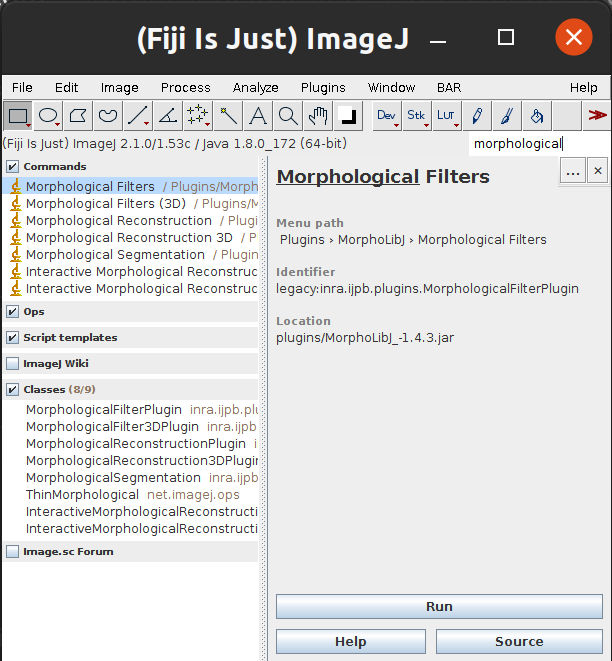
Above, we found the “Morphological Filters” plugin, part of MorphoLibJ.
- 选择标识符,减去前缀(
legacy:或command:)。其余的部分 of the string is a known as a “fully qualified Java class name”, and we will use it to find the artifact string, which is colon-separated pair ofgroupId:artifactId. (As you might have guessed,groupIdrepresents the group that produced the plugin, and is typically a reversed domain name. So, for example, core ImageJ artifacts are in the groupnet.imagej. And theartifactIdis the name of the artifact itself, typically matching the.jarfilename.) -
导航至 SciJava Maven repository your browser, and into the search box there, paste the string you copied—in our example, it is
inra.ijpb.plugins.MorphologicalFilterPlugin. Then press ↵ Enter to search for the class. You should see results like this appear: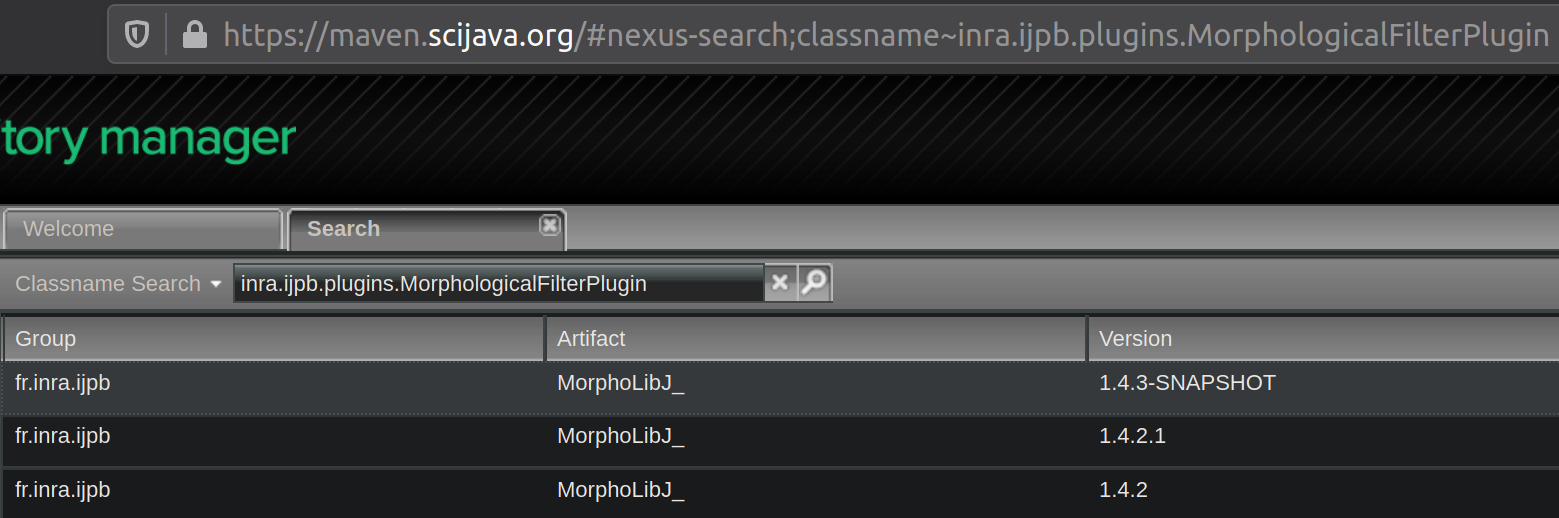
Notice how it says “Classname Search” in the lefthand dropdown box? If it says something else, click it and change it to “Classname Search” and try pasting the class string again. Above, we have found our artifact string! The group is
fr.inra.ijpb, and the artifact isMorphoLibJ_. So the front matter we should add is:artifact: fr.inra.ijpb:MorphoLibJ_Some day, we’ll improve the ImageJ search bar to show each plugin’s artifact string directly in the results pane. But it doesn’t do that yet.
- 如果你在 maven.scijava.org 搜索中没有好运,这里是
another approach: when you find the plugin of interest via the ImageJ
search bar, try clicking the Source button. If the plugin is well-designed,
it will open up the plugin’s source code on GitHub. You can then navigate
to the top of that repository, click on the
pom.xmlfile, and read thegroupIdandartifactIdout of that XML file. 如果您无法找到任何特定的 Maven 工件字符串 插件请在论坛的聊天室询问~~ 有人会帮助你!
手动统计框
有些插件没有 Maven 工件,因为开发者没有发布 maven.scijava.org 的插件。在这种情况下,您可以迁移所有信息框 手动将字段添加到前面的内容中。这是之前和之后的示例 DHM Utilities/Reconstruction插件: before (info-box) / after (statbox)。
第Cross Sectional Analyzer规定
手动使用 statbox 字段的另一个示例。
表格单元格不在正确的位置
一些从旧维基转换而来的表格失去了rowspan和colspan
信息,导致单元格跨行或列倾斜。与
旧维基,并添加例如colspan=5 或 rowspan=3(视细胞情况而定)
需要它。
缺少内容块
现在,如果您发现任何问题,请在论坛上的聊天中大声说出来。特别是, 边箱中的某些内容可能并未继承原始内容 页。一旦我们更好地掌握了哪些类型的页面缺少内容, 我们可以在这里概述解决这些情况的最佳方法。
在 GitHub 上提交问题
页面可能存在您不知道如何修复的问题。或者你可能会注意到 站点基础设施或布局的问题,影响的不仅仅是 单页。在这些情况下,最好记下该问题,以便 不会被遗忘,并且可以在以后修复,最好是由有足够能力的人修复 专业知识。
要提交问题,请点击以下链接:
输入主题和描述。请务必回答:
- 哪个页面有问题?
- 页面哪里有问题?
- 还有其他相关细节吗?
如果您认为需要修复在我们启动网站之前
星期五,您可以单击 Milestone 旁边的齿轮符号并将其添加到
production里程碑。
准备好后点击“提交新问题”。
