

本页提供CIP过滤器功能包的用户文档
One can found additional information on the function parameters (type, optional/required, positional/named) on the 参数文档页面。
要访问另一类 CIP 功能:格式, 筛选, 数学, 部分, 评估, 实验性的.
高斯
描述
gauss creates a gaussian blurred image. it convolves the image with a gaussian weighted window. Gaussian blurring is commonly used for image denoising as it smoothes out small details.
签名
outputImage = cip.gauss( inputImage* , radius* , boundary , pixelSize)
输入
inputImage* :要处理的图像
radius* :表示高斯核标准差沿图像轴的标准差的标量或标量列表
boundary : {‘min’, ‘max’, ‘same’, ‘zero’, ‘镜子’,’periodic’} 中的字符串,默认为镜像
pixelSize :沿图像维度的标量或标量列表。默认值为 1。
输出
outputImage:处理后的图像。它始终与输入图像的大小相同。 例子
img2 = cip.gauss( img1 , 5 )
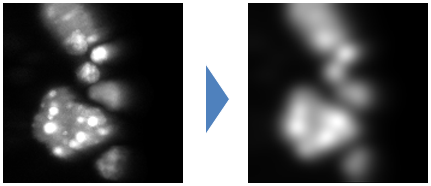
执行
CIP gauss implementation wraps the gauss ops, itself relying on the imglib2 gauss3 implementation.
侵蚀
描述
Erosion shrinks the region in an image by a certain radius. It works both with binary and graylevel images. This effect is obtained by replacing each pixel value by the minimum value found in a window surrounding that pixel.
签名
outputImage = cip.erode( inputImage*, radius*, shape, boundary, pixelSize)
输入
inputImage* :图像处理
radius* :表示滤波器窗口沿轴图像的一半大小的整数或整数列表。
shape :{‘矩形’, ‘disk’} 中的字符串,描述用于处理窗口的形状。
boundary : {‘min’, ‘max’, ‘same’, ‘mirror’, ‘periodic’} 中的字符串,默认为镜像
pixelSize :沿着图像维度的标量或标量列表。默认值为1。
输出
outputImage:处理后的图像。 例子
img2 = cip.erode( img1 , 2 )
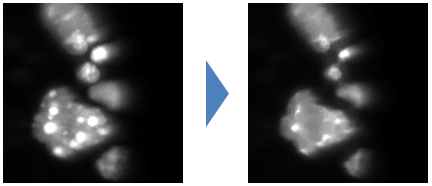
执行
CIP function wraps the imglib2 Erosion class from the morphology package.
扩张
描述
this filter dilate the region in an image by a certain radius. It works both with binary and graylevel images. This effect is obtained by replacing each pixel value by the maximum value found in a window surrounding that pixel.
签名
outputImage = cip.dilate( inputImage* , radius*, shape, boundary, pixelSize)
输入
inputImage* :图像处理
radius* :表示滤波器窗口沿图像轴的一半大小的整数或整数列表。
shape :{‘长方形’, ‘disk’} 中的字符串,描述用于处理的窗口的形状。
boundary : {‘min’, ‘max’, ‘same’, ‘镜子’, ‘periodic’} 中的字符串,默认为镜像
pixelSize :沿图像维度的标量或标量列表。默认值为 1。
输出
outputImage:处理后的图像。 例子
img2 = cip.dilate( img1 , 2 )
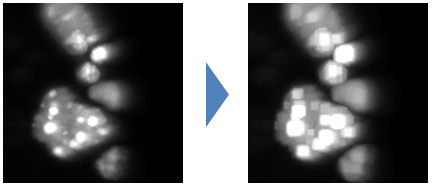
执行 CIP 函数包装了形态学包中的imglib2 Dilation class。
开幕
描述
This filter performs an erosion followed by a dilation. It erases small and thin objects.
签名
outputImage = cip.opening( inputImage* , radius* , shape, boundary, pixelSize)
输入
inputImage* :图像处理
radius* :表示滤波器窗口沿轴图像的一半大小的整数或整数列表。
shape :{‘矩形’, ‘disk’} 中的字符串,描述用于处理窗口的形状。
boundary : {‘min’, ‘max’, ‘same’, ‘mirror’, ‘periodic’} 中的字符串,默认为镜像
pixelSize :沿着图像维度的标量或标量列表。默认值为1。
输出
outputImage:处理后的图像。 例子
img2 = cip.opening( img1 , 5 )
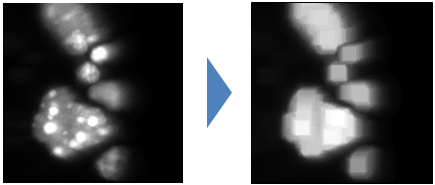
执行
CIP function wraps the imglib2 Opening class from the morphology package.
结束
描述
This filter performs a dilation followed by an erosion. It closes small holes and thin gaps between or inside objects.
签名
outputImage = cip.closing( inputImage* , radius* , shape, boundary, pixelSize)
输入
inputImage* :图像处理
radius* :表示滤波器窗口沿图像轴的一半大小的整数或整数列表。
shape :{‘长方形’, ‘disk’} 中的字符串,描述用于处理的窗口的形状。
boundary : {‘min’, ‘max’, ‘same’, ‘镜子’, ‘periodic’} 中的字符串,默认为镜像
pixelSize :沿图像维度的标量或标量列表。默认值为 1。
输出
outputImage:处理后的图像。 例子
img2 = cip.closing( img1 , 16, 'disk' )
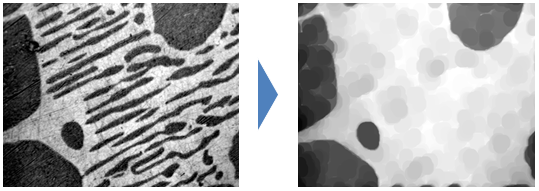
执行
The implementation successively applies CIP erosion and dilation functions.
高帽
描述
This filter subtract an opening of the input image to the input image. It removes object larger than the user selected radius in image while keeping smaller scale details.
签名
outputImage = cip.closing(inputImage*, radius*, shape, boundary, pixelSize)
输入
inputImage* :图像处理
radius* :表示滤波器窗口沿图像轴的一半大小的整数或整数列表。
shape :{‘长方形’, ‘disk’} 中的字符串,描述用于处理的窗口的形状。
boundary : {‘min’, ‘max’, ‘same’, ‘镜子’, ‘periodic’} 中的字符串,默认为镜像
pixelSize :沿图像维度的标量或标量列表。默认值为 1。
输出
outputImage:处理后的图像。
例子
img2 = cip.tophat( img1 , 5, 'disk' )
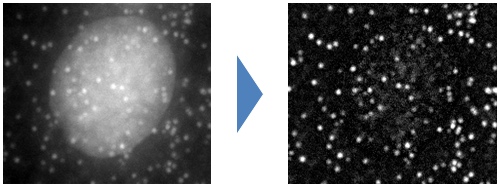
执行
The function relies on ops for subtraction and CIP for the opening.
# 距离
描述
this function create an image where each pixel value correspond between the distance of that pixel to the closest background object in the input image
签名
outputImage = cip.distance(inputImage*, threshold, pixelSize)
输入
inputImage* :图像处理
阈值:如果输入图像不是二进制的,则该值可用于对图像进行阈值设置。如果输入图像是二进制的,则该值将被忽略
pixelSize :表示沿图像维度的像素大小的标量或标量列表。默认值为 1。
输出
outputImage:处理后的图像。
例子
img2 = cip.distance( img1 , 500 )或img2 = cip.distance( img1 , 'threshold', 500 )
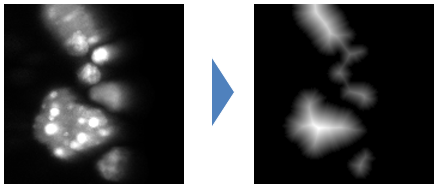
img2 = cip.distance( img1 )将为二值图像构建距离图。
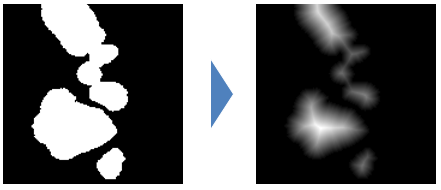
执行
The function relies on ops distance function implementation.
中位数
描述
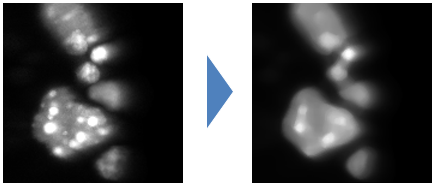
This filter is used to denoise image. It is well suited to remove impulse noise.Compare to the gaussian filter it preserve edges better but has higher computationnal cost. Its basic principle is to replace a pixel value with the median value in a window surrounding that pixel.
签名
outputImage = cip.median(inputImage*, radius*, shape, boundary, pixelSize)
输入
inputImage* :图像处理
radius* :表示滤波器窗口沿图像轴的一半大小的整数或整数列表。
shape :{‘长方形’, ‘disk’} 中的字符串,描述用于处理的窗口的形状。
boundary : {‘min’, ‘max’, ‘same’, ‘镜子’, ‘periodic’} 中的字符串,默认为镜像
pixelSize :沿图像维度的标量或标量列表。默认值为 1。
输出
outputImage:处理后的图像。
例子
img2 = cip.median( img1 , 5 )
执行
The function relies on ops that implement a brute force approach of the median filtering. It would be possible to implement more efficient approach using histogram and cord decomposition such ImageJ 1.x implementation for 2D image.
反转
描述
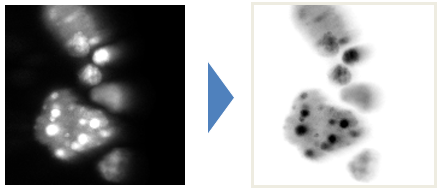
This function invert the gray value of the input image such that each pixel value I is replaced by max+min-I , where are min (resp max) are the minimum (resp maximum) intensity in the input image.
签名
outputImage = cip.invert(inputImage*)
输入
inputImage* :要处理的图像
输出
outputImage:处理后的图像。
例子
img2 = cip.invert( img1 )
执行
The function implementation uses ops map function
