


自迁移出 MediaWiki 以来,本页内容尚未经过审查。如果您愿意帮忙,请查看帮助指南!
如何显示和展示自定义表面
您可以下载本指南 here 的示例来源代码。
在阅读本操作指南之前,阅读The relation between Content and Universe可能会得到帮助。
简单网格:线、三角形、点……
查看器的优点之一是使自定义网格的显示变得非常简单。定义用户的点、线、三角形或四边形网格可以非常容易地显示:
// Create a set of points
List<Point3f> mesh = new ArrayList<Point3f>();
mesh.add(new Point3f(-100, -100, 50));
mesh.add(new Point3f(100, -100, 50));
mesh.add(new Point3f(0, 100, 50));

// Create a universe and show it
Image3DUniverse univ = new Image3DUniverse();
univ.showAttribute(
		Image3DUniverse.ATTRIBUTE_COORD_SYSTEM, false);
univ.show();

// Add the mesh as points
CustomPointMesh cm = new CustomPointMesh(mesh);
cm.setColor(new Color3f(0, 1, 0));
univ.addCustomMesh(cm, "points");
cm.setPointSize(10);

// Add the mesh as a triangle
CustomTriangleMesh tm = new CustomTriangleMesh(mesh);
tm.setColor(new Color3f(0, 0, 1));
Content c = univ.addCustomMesh(tm, "triangle");

// Add the mesh as a triangle
mesh.add(new Point3f(mesh.get(0))); // to close the path
CustomLineMesh lm = new CustomLineMesh(
		mesh, CustomLineMesh.CONTINUOUS);
lm.setColor(new Color3f(1, 0, 0));
univ.addCustomMesh(lm, "lines");
lm.setLineWidth(5);
lm.setPattern(CustomLineMesh.DASH);

// after adding the CustomMesh to the universe, we have a
// reference to the Content, which can be used for further
// modification
c.setTransparency(0.5f);
更复杂的网格,如球体、管子等
ImageJ3DUniverse中还存在添加自定义网格的便捷方法,因此自己需要CustomMesh创建。相应的方法可以在下面找到。
要创建更复杂的架构,可以使用Mesh_Maker类的辅助方法:
// Use Mesh_Maker to create more complex surfaces like spheres,
// tubes or discs:

// define a sphere with center at the origin and radius 50
double x = 0, y = 0, z = 30, r = 50;
int meridians = 24;
int parallels = 24;
mesh = Mesh_Maker.createSphere(x, y, z, r, meridians, parallels);
Color3f color = null;
univ.addTriangleMesh(mesh, color, "sphere");
有效地显示许多表面
例如,假设人们希望一起显示 1000 个球体。当然可以单独添加每个球体,但有一种更有效的方法:
用户可以使用Mesh_Maker为每个球体创建一个网格,并将生成的列表连接起来,以便获得一个大列表,然后可以将其添加为一个CustomMesh(如果是球体,这将是CustomTriangleMesh)。
只有当所有网格体的类型相同时,此方法才有效;例如,不能将线网格与点网格组合起来。
还有一个缺点;单独添加每个球体意味着每个球体都表示为单独的Content,其属性可以单独更改。将所有球体添加为组合网格将仅产生一个Content,其属性将影响所有球体。
customnode包的类层次结构
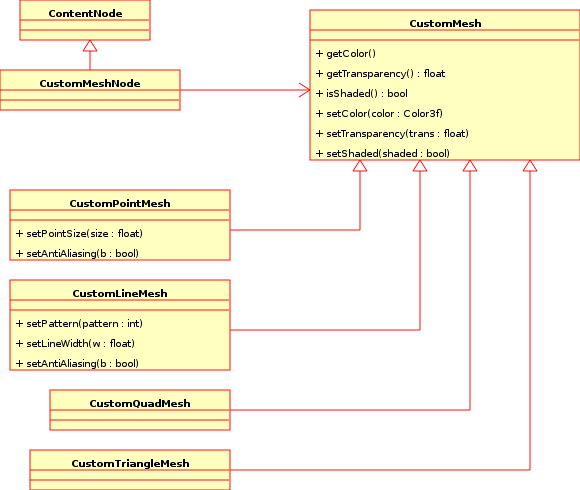 Relation between classes in the
 customnode package.
CustomMeshNode扩展了ContentNode,因此实现了ContentNode中的所有抽象方法。它引用了CustomMesh,这是一个抽象类,由 CustomPointMesh、CustomLineMesh、CustomTriangleMesh 和 CustomQuadMesh 实现。
完全控制自定义节点
CustomMesh 实现基本功能,以及在子类中使用的默认 Java3D Appearance 对象。由于CustomMesh扩展了Shape3D类,它提供了方法setAppearance()和setGeometry(),这使得拥有Java3D经验的用户可以完全控制CustomMeshNode的内容。
###重要方法
Image3DUniverse:
public Content addCustomMesh(CustomMesh mesh, String name);

public Content addLineMesh(List<Point3f> mesh, Color3f color, String name,
        boolean strips);

public Content addPointMesh(List<Point3f> mesh, Color3f color, String name);

public Content addQuadMesh(List<Point3f> mesh, Color3f color, String name);

public Content addTriangleMesh(List<Point3f> mesh, Color3f color, String name);
CustomMesh:
The methods of CustomMesh are inherited by CustomLineMesh, CustomPointMesh,CustomTriangleMesh and CustomQuadMesh. They can be used next to similar functions which are provided by the Content class, once the wrapping Content is created, however, it is recommended to use the methods there.
    public Color3f getColor();

    public void setColor(Color3f color);

    public float getTransparency();

    public void setTransparency(float transparency);

    public boolean isShaded();

    public void setShaded(boolean b);
CustomLineMesh:
    public void setPattern(int pattern);

    public void setAntiAliasing(boolean b);

    public void setLineWidth(float w);
CustomPointMesh:
    public void setPointSize(float pointsize);

    public void setAntiAliasing(boolean b);
CustomTriangleMesh:
no additional methods.
CustomQuadMesh:
no additional methods.
Mesh_Maker:
    static public List createSphere(double x, double y, double z, double r);

    static public List createSphere(double x, double y, double z, double r,
                int meridians, int parallels);

    static public List createTube(double[] x,  double[] y,  double[] z,
                double[] r,  int parallels,  boolean do_resample);

    static public List createDisc(double x, double y, double z,
                double nx, double ny, double nz,
                double radius,
                int edgePoints );
