


自迁移出 MediaWiki 以来,本页内容尚未经过审查。如果您愿意帮忙,请查看帮助指南!
|
|
|
| 软件 | IJPB-plugins |
| 来源 |
简介
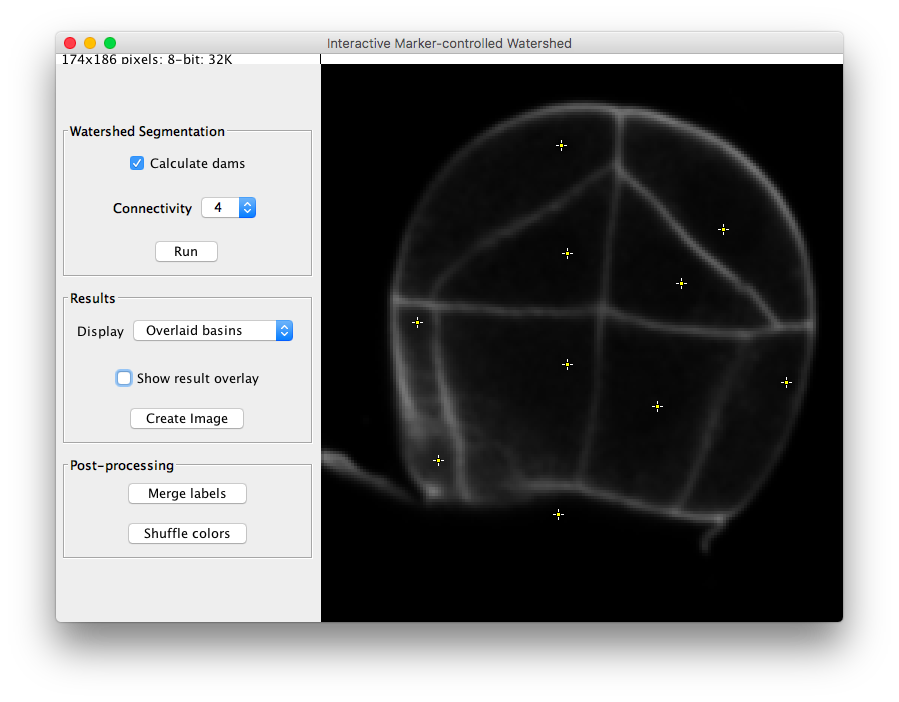 Similar to the Marker-controlled Watershed plugin, this ImageJ/Fiji plugin segments grayscale images of any type (8, 16 and 32-bit) in 2D and 3D using the marker-controlled watershed algorithm by Meyer and Beucher (1990) and it floods the image from specific seed points, but this time the points are introduced interactively by the user.
用法
交互式标记控制的分水岭可以在任何开放的灰度图像、单个 2D 图像或 (3D) 堆栈上运行。如果调用插件时没有打开图像,底部弹出“打开”对话框。
用户可以在主中部平移、放大和缩小或在切片之间滚动(如果输入图像是堆栈),就像任何其他ImageJ窗口一样。中部的尖端有三个参数面板,一个包含一个输出分水岭参数,一个用于输出分水岭(结果)选项,一个用于对结果进行后期处理。所有按钮、空白和面板都包含其功能的简短说明,当悬山顶停止在它们上面时会显示该说明。
吸引力标记
在插件中,用户使用任何选择工具以交互方式引入标记。默认情况下,点选择工具将在 ImageJ 主工具上强制启用。要选择不同的切片上的标记,一种选择将使用点选择工具,并在每次单击时设置新标记时按住 SHIFT 键。另一种可能性是使用 ROI 管理器。在这种情况下,管理器中所有选定的 ROI 辅助标记
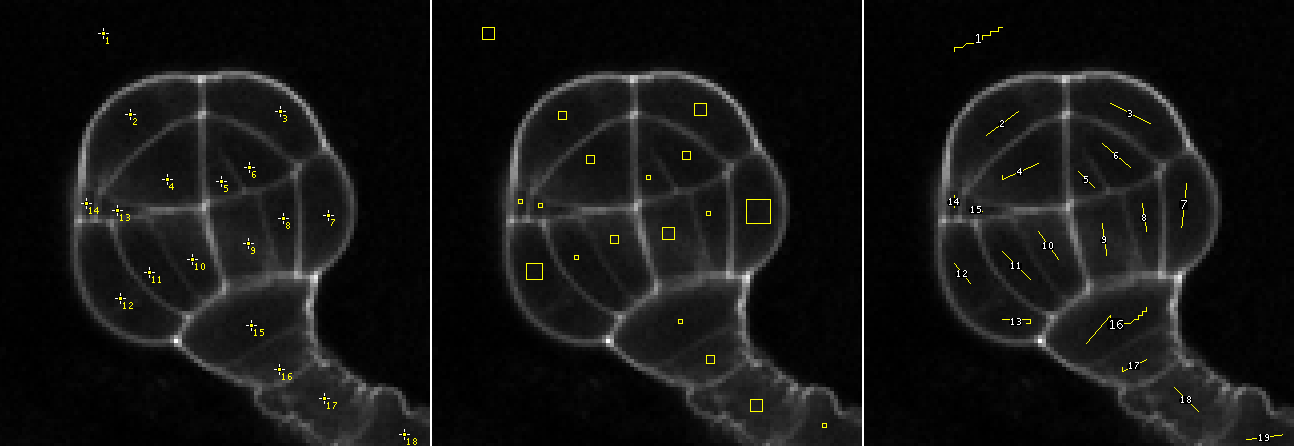 Examples of ROIs used as markers by the plugin.
分水岭分割面板
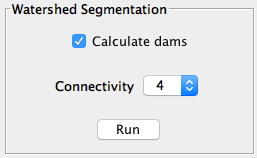 This panel is reserved to the parameters involved in the segmentation pipeline:
- 计算水坝:取消选中此选项可生成没有分水岭线的分段。
- 连接性:体素连接性(2D 中为 4-8,3D 中为 6-26)。选择非对角连接(4 或 6)通常会提供更圆润的对象。 最后,单击“运行”启动机箱。如果您的机箱占用的时间太长或者您由于任何原因想要停止它,您可以通过单击相同的按钮(此时过程中应显示“停止”)来完成此操作。
结果面板
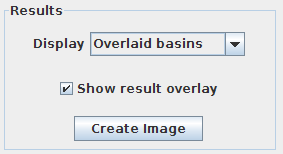 Only enabled after running the segmentation.
- 显示:显示分割结果的选项列表。
- Overlaid basins: colored objects overlaying the input image (with or without dams depending on the selected option in the Watershed Segmentation panel).
- Overlaid dams: overlay the watershed dams in red on top of the input image (only works if “Calculate dams” is checked).
- Catchment basins: colored objects.
- Watershed lines: binary image showing the watershed lines in black and the objects in white (only works if “Calculate dams” is checked).
- 显示结果叠加:切换结果叠加。
- 创建图像按钮:创建一个新图像,并将结果显示在画布中。
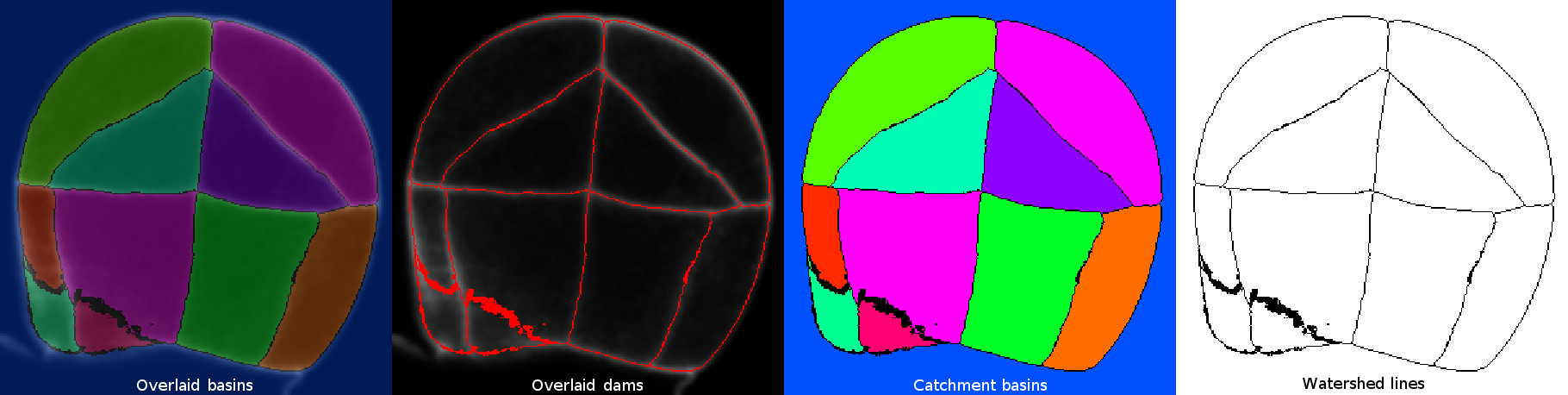 Examples of the 4 different display options.
后处理面板
 Similarly to the Results panel, this panel only gets enabled after running the segmentation pipeline.
- 合并标签:将“徒手”选择工具(在单个切片上)或点工具(在单个或多个切片上)选择的标签合并在一起。零值标签属于流域大坝,因此被选中时将被忽略。第一个选定的标签值将分配给其余选定的标签,这些标签将共享其颜色。

To select labels on different slices, use the point selection tool and keep the SHIFT key pressed each time you click on a new label.
- 随机颜色:随机重新为标签颜色分配。当两个相邻标签呈现相似颜色时,这是一个非常方便的选项。
安装
标记控制的 Watershed 插件是 MorphoLibJ 库的部分。要安装它,您只需 add IJPB-插件更新站点:
1) 从斐济菜单中选择Plugins › MorphoLibJ › Segmentation即可启动更新程序。
2) 单击管理更新站点。这将弹出一个对话框,您可以在其中激活其他更新站点。
3) 激活 IJPB 插件更新站点并关闭对话框。现在您应该会看到一个额外的 jar 文件供下载。
4) 单击应用更改并重新启动斐济。
您现在应该在子菜单Help › Update…下找到该插件。
注意:标记控制的分水岭只是 MorphoLibJ 套件中包含的插件之一。通过遵循这些安装步骤,您将安装套件中的其余插件。
参考文献
- 费尔南德·迈耶和塞尔日·博彻。“形态分割。”视觉传播与图像表示杂志 1.1 (1990): 21-46。
- Soille, P.,“形态图像分析:原理和应用”,Springer-Verlag,1999年,第170-171页。
- 大卫·勒格兰、伊格纳西奥·阿尔甘达-卡雷拉斯、菲利普·安德烈; MorphoLibJ: integrated library and plugins for mathematical morphology with ImageJ。生物信息学2016; 32(22):3532-3534。 doi:10.1093/生物信息学/btw413
另请参阅
- Morphological Segmentation,一个带有图形用户界面的插件,用于根据形态学操作和分水岭算法分割2D/3D图像。
- Classic Watershed,插件实现原始分水岭算法来分割2D/3D灰度图像。
- Serge Beucher’s site,带有分水岭算法的图形描述和动画。
- G. Bertrand’s Topological Watershed site,包含论文、幻灯片和来源代码。
许可证
该是免费软件;您可以根据自由软件基金会 (http://www.gnu.org/licenses/gpl.txt) 发布的 GNU 通用公共许可证 程序的条款重新分发和/或修改它。
分发此程序的目的是希望它有用,但不提供任何保证;甚至没有适用性或特定用途适用性的默许保证。有关更多详细信息,请参阅 GNU 通用公共许可证。
