


自迁移出 MediaWiki 以来,本页内容尚未经过审查。如果您愿意帮忙,请查看帮助指南!
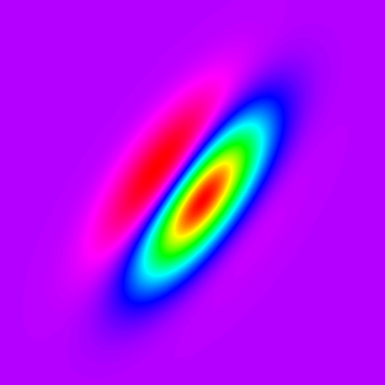 Example of a two-dimensional Gabor filter kernel (with a spectrum LUT).
This is an example of how to create Gabor filters in Fiji using Beanshell scripting. The script will create and apply a set of Gabor filters to the currently selected image.
可以调整五个不同的参数:
- Sigma,定义高斯包网络的大小
- Psi,相位偏移
- Gamma,空间纵横比,指定Gabor函数的支撑度的圆度。
- Fx,正弦数量的频率
- nAngles,滤波器方向的数量
结果,脚本将显示一组过滤器、每个方向的原始图像的过滤版本以及过滤图像堆栈的投影(简单、顶部、均值和透视)。
示例
这是使用 Leaf 示例图像 (File › Open Samples › Leaf (36K)) 和 sigma = 8.0、gamma = 0.25、psi = 0.0、Fx = 3.0、nAngles = 5 的脚本结果示例。<div class="thumbnail" >
Example of a two-dimensional Gabor filter kernel (with a spectrum LUT).
</div>
代码
import ij.*;
import ij.process.*;
import ij.plugin.filter.*;
import ij.plugin.ContrastEnhancer;
import ij.plugin.ZProjector;

/**
* This script calculates a set of Gabor filters over the selected image.
*
* Parameters: sigma, gamma, psi, Fx, nAngles
*/

// Sigma defining the size of the Gaussian envelope
sigma = 8.0;
// Aspect ratio of the Gaussian curves
gamma = 0.25;
// Phase
psi = Math.PI / 4.0 * 0;
// Frequency of the sinusoidal component
Fx = 3.0;

// Number of diferent orientation angles to use
nAngles = 5;

// copy original image and transform it to 32 bit
originalImage = IJ.getImage();
originalImage = new ImagePlus(originalImage.getTitle(), originalImage.getProcessor().convertToFloat());
width = originalImage.getWidth();
height = originalImage.getHeight();

// Apply aspect ratio to the Gaussian curves
sigma_x = sigma;
sigma_y = sigma / gamma;

// Decide size of the filters based on the sigma
largerSigma = (sigma_x > sigma_y) ? (int) sigma_x : (int) sigma_y;
if(largerSigma < 1)
    largerSigma = 1;

ip = originalImage.getProcessor().duplicate();

sigma_x2 = sigma_x * sigma_x;
sigma_y2 = sigma_y * sigma_y;

// Create set of filters

filterSizeX = 19; //6 * largerSigma + 1;
filterSizeY = 19; //6 * largerSigma + 1;


middleX = (int) Math.round(filterSizeX / 2);
middleY = (int) Math.round(filterSizeY / 2);

is = new ImageStack(width, height);
kernels = new ImageStack(filterSizeX, filterSizeY);

rotationAngle = Math.PI/(double)nAngles;
// Rotate kernel from 0 to 180 degrees
for (i=0; i<nAngles; i++)
{
    theta = rotationAngle * i;
    filter = new FloatProcessor(filterSizeX, filterSizeY);
    for (int x=-middleX; x<=middleX; x++)
    {
        for (int y=-middleY; y<=middleY; y++)
        {
            xPrime = (double)x * Math.cos(theta) + (double)y * Math.sin(theta);
                yPrime = (double)y * Math.cos(theta) - (double)x * Math.sin(theta);

            a = 1.0 / ( 2.0 * Math.PI * sigma_x * sigma_y ) *
                            Math.exp(-0.5 * (xPrime*xPrime / sigma_x2 + yPrime*yPrime / sigma_y2) );
            c = Math.cos( 2.0 * Math.PI * (Fx * xPrime) / filterSizeX + psi);

            filter.setf(x+middleX, y+middleY, (float)(a*c) );
        }
    }
    kernels.addSlice("kernel angle = " + theta, filter);
}

// Show kernels
ip_kernels = new ImagePlus("kernels", kernels);
ip_kernels.show();

// Apply kernels
for (i=0; i<nAngles; i++)
{
    theta = rotationAngle * i;
    c = new Convolver();

    kernel = (float[]) kernels.getProcessor(i+1).getPixels();
    ip = originalImage.getProcessor().duplicate();
    c.convolveFloat(ip, kernel, filterSizeX, filterSizeY);

    is.addSlice("gabor angle = " + i, ip);
}


// Normalize filtered stack
c = new ContrastEnhancer();
for(int i=1 ; i <= is.getSize(); i++)
{
    c.stretchHistogram(is.getProcessor(i), 0.4);
}


projectStack = new ImagePlus("filtered stack",is);
IJ.run(projectStack, "Enhance Contrast", "saturated=0.4 normalize normalize_all");

resultStack = new ImageStack(width, height);

zp = new ZProjector(projectStack);
zp.setStopSlice(is.getSize());
for (int i=0;i<=5; i++)
{
    zp.setMethod(i);
    zp.doProjection();
    resultStack.addSlice("Gabor_" + i
            +"_"+sigma+"_" + gamma + "_"+ (int) (psi / (Math.PI/4) ) +"_"+Fx,
            zp.getProjection().getChannelProcessor());
}

// Display filtered images
(new ImagePlus("gabor, sigma="+sigma+" gamma="+gamma+ " psi="+psi, is)).show();

result= new ImagePlus ("Gabor stack projections", resultStack) ;
IJ.run(result, "Enhance Contrast", "saturated=0.4 normalize normalize_all");
result.show();
