


自迁移出 MediaWiki 以来,本页内容尚未经过审查。如果您愿意帮忙,请查看帮助指南!
|
|
|
| 文件 |
Multi_Stack_Montage.jar |
| 来源 |
目的
该插件带来了使用 Make Montage… 插件无法提供更多功能,即从多个堆栈和超堆栈中制作蒙太奇。
安装
该插件可从 PTBIOP Update Site 获取,这将其放置在 Fiji/ImageJ 插件目录中的“BIOP”文件夹中
使用
使用Plugins › BIOP › Multi Stack Montage…调用插件并选择您想要使用的堆栈。
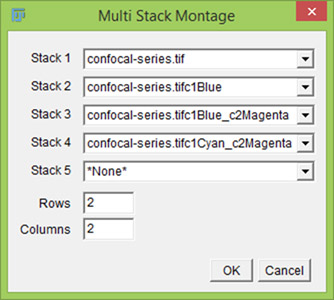
Interface of the plugin

If you are going to make a montage, you need each stack to be as follows:
- Same number of Channels, Slices and Timepoints
- Same Data Type (8-bit, 16-bit, 32-bit or RGB)
在打开许多图像的情况下,该插件不会预先选择任何图像。
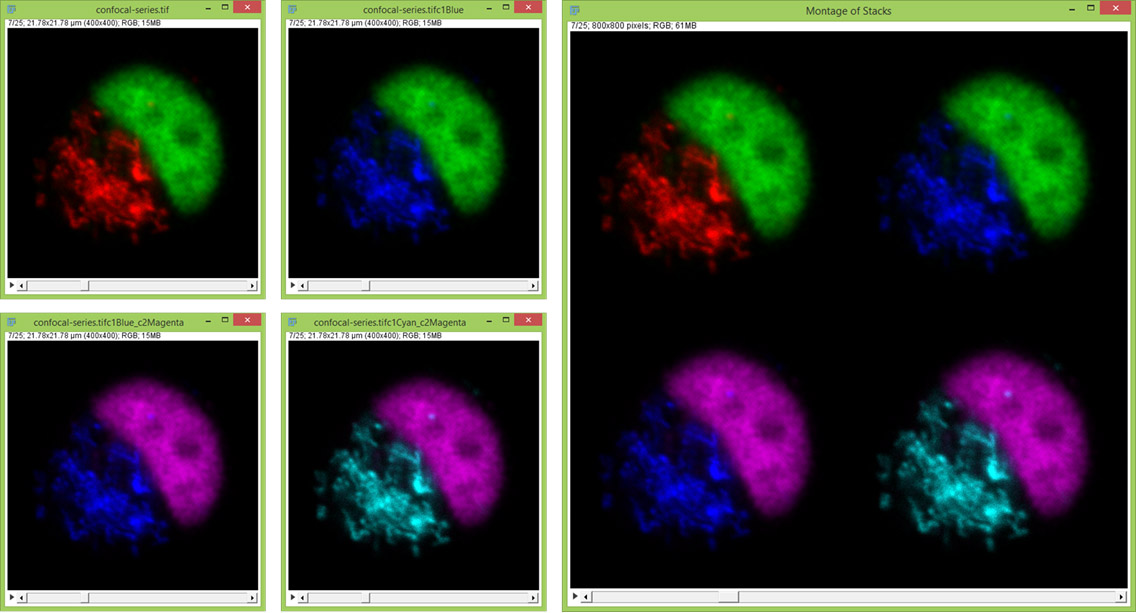
Example on RGB Stacks. Also works on multichannel, multislice, timepoints and any combination
当剪辑多个视图或一次性剪辑 RGB 数据集时,此插件非常有用。
可录制宏
利用 GenericDialog 类,该插件可以进行宏记录。
run("Multi Stack Montage...", "stack_1=Image1 stack_2=[Another Image] stack_3=Image3 rows=2 columns=2");
来自插件运行
在插件中运行它是需要
import ch.epfl.biop.StackMontage;
然后调用静态方法
ImagePlus montaged_image = StackMontage.montageImages(ArrayList<ImagePlus> theimages, int nrows, int ncols);
您可以看看这个正在运行的 StackMontage 的最小插件。
import ij.*;
import ij.plugin.*;

// Required by StackMontage
import java.util.ArrayList;
import ch.epfl.biop.StackMontage;

/**
 * Short example on making hyperstack montages
 * @author Romain Guiet, Olivier Burri
 * @version 1.0
 */
public class My_Plugin implements PlugIn {

    public void run(String arg) {

        // Make some nice images
        ImagePlus imp = IJ.openImage("https://imagej.net/ij/images/confocal-series.zip");
        String imageName = imp.getTitle();

        // Recolor them
        ImagePlus imp1 = new Duplicator().run(imp, 1, 2, 1, 25, 1, 1);
        IJ.run(imp1, "Blue", "");
        imp1.setTitle(imageName+"c1Blue");

        ImagePlus imp2 = new Duplicator().run(imp1, 1, 2, 1, 25, 1, 1);
        imp2.setC(2);
        IJ.run(imp2, "Magenta", "");
        imp2.setTitle(imageName+"c1Blue_c2Magenta");

        ImagePlus imp3 = new Duplicator().run(imp2, 1, 2, 1, 25, 1, 1);
        imp3.setC(1);
        IJ.run(imp3, "Cyan", "");
        imp3.setTitle(imageName+"c1Cyan_c2Magenta");

        IJ.run(imp3, "RGB Color", "slices");
        IJ.run(imp2, "RGB Color", "slices");
        IJ.run(imp1, "RGB Color", "slices");
        IJ.run(imp, "RGB Color", "slices");


        // Montage Options
        int nrows = 2;
        int ncols = 2;

        // Prepare container for images
        ArrayList<ImagePlus> images = new ArrayList<ImagePlus>();

        // Add images to ArrayList for the montage
        images.add(imp);
        images.add(imp1);
        images.add(imp2);
        images.add(imp3);


        // Make the montage
        ImagePlus impr = StackMontage.montageImages(images, nrows, ncols);
        // Show the result
        impr.show();
    }

}
注释
对话框限制为10个元素,否则窗口可能大于显示器的垂直分辨率。,如果从宏录制器调用它,则不受限制。
您不需要输入“*None*”作为最后一个堆栈。
