


TrackMate-ExTrack:活细胞中的扩散并结合动力学。
TrackMate-ExTrack 是一个 TrackMate 操作,包含 Python 分析工具 ExTrack 到 Java 和 TrackMate 的端口。 描述该工具背后科学原理的论文所在:
如果 ExTrack 对您的研究有用,请引用它。
ExTrack 的 Python 版本应该被视为名义上的主要来源,可以在 on its GitHub repo 中找到。 本页仅记录 TrackMate 端口。
TrackMate 中的 ExTrack 分析。
ExTrack 膳食分析,可以确定粒子是否执行扩散运动或被束缚并显示为卡住。 重要的是,ExTrack 可以解决单个粒子从一种状态到另一种状态的转变。 它的设计对噪声指标具有鲁棒性,即使在面临更大的定位偏差时也能提供出色的精度。 查看文章以了解有关 ExTrack 工作原理的详细信息。
此 TrackMate 端口包含您可以在 Python 标称版本中找到功能的子集。 主要是:假设您接下来的消耗品状态最多有2种。 它可以是束缚态和扩散态,也可以是具有不同扩散系数的两种扩散态。 如果您需要解析 2 个以上的状态,请遵循上面链接的 Python 实现。
##安装。
TrackMate-ExTrack 作为可选 ImageJ update site 提供。 点击转到斐济更新程序并在更新站点列表中,检查TrackMate-ExTrack更新站点并重新启动斐济。
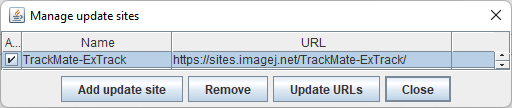
满足。
ExTrack 对现有曲目进行分析,因此您需要使用 TrackMate 生成它们或导入它们。 TrackMate-ExTrack 分析是一个操作,通过 TrackMate UI 中的最后一个面板启动:
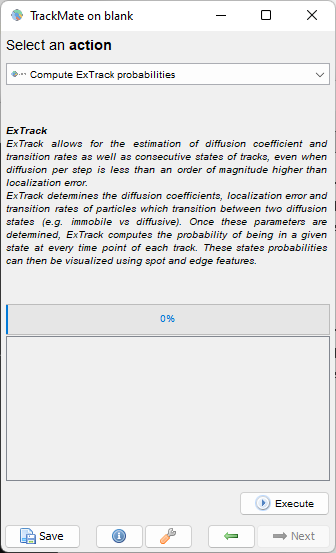
选择此操作并单击Execute按钮。
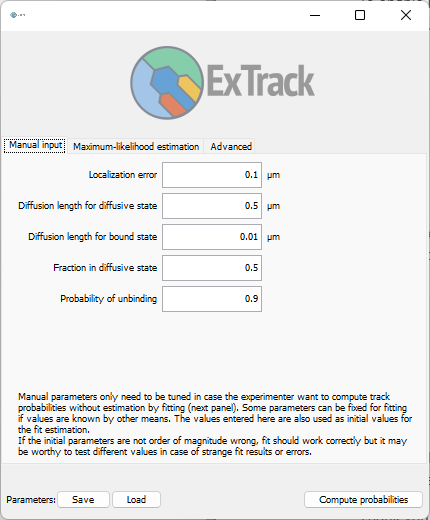
TrackMate-ExTrack UI窗口显示:
简短教程。
这是关于合成数据的简短教程,最好地解释了 ExTrack 如何工作。 Francois 准备了 400 个在扩散态和束缚态之间切换的合成道具,将它们排列在 20x20 的网格上。 然后他将相应的曲目保存为 TrackMate 文件。 您可以在 Zenodo 上获取 TrackMate 文件(以及更多):

我们将首先处理simulated_tracks.xml文件。
这是一个 TrackMate XML 文件:
<?xml version="1.0" encoding="UTF-8"?>
<TrackMate version="7.7.2">
  <Log>Session log saved in the file
...</Log>
  <Model spatialunits="µm" timeunits="s">
    <FeatureDeclarations>
      <SpotFeatures>
        <Feature feature="QUALITY" name="Quality" shortname="Quality" dimension="QUALITY" isint="false" />
在斐济,转至_插件>跟踪>加载TrackMate文件_菜单项。
浏览至simulated_tracks.xml文件。
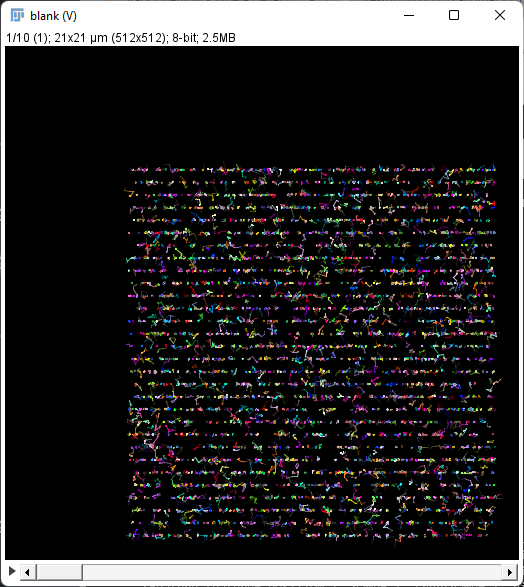
TrackMate 将打开曲目,但由于没有关联的图像,因此您将在空白图像中看到它们:
在 TrackMate 窗口中,单击 Next 按钮移至 操作 面板。
选择名为_计算 ExTrack 概率_的操作,然后单击 Execute 按钮。
应出现如上所示的 ExTrack 窗口。
ExTrack界面由3个面板组成:手动输入、最大似然估计_和_高级。
为了使 ExTrack 工作,它需要估计几个参数的值:
Localization error是物理单位中点位置精度的担忧。Diffusion length for diffusive state涉及第一运动状态的扩散系数,假设为扩散状态。在2D中,它等于_2√Dt_,其中_D_是扩散系数,_t_是帧间隔。- 同样,
Diffusion length for bound state涉及第二运动状态,假设为卡居住状态。 Fraction in diffusive state是第一个状态(扩散状态)的粒子的平均份额。Probability of unbinding是粒子在帧间隔内从束缚态进入扩散态的概率。
第一个面板允许手动输入这些参数的值(如果已知)。 当然,这些值只有在理想情况下才是已知的,这就是为什么 ExTrack 提供了一种仅根据粒子运动来估计它们的方法。
转到第二个面板,最大似然估计。
点击Start estimaton按钮。
该过程依赖于最大似然估计(MLE)并使用手动输入的值作为起始猜测。
ExxTrack 相对平稳,因此如果初始值不是太远,MLE 应该收敛。
估计可能会很长;在我的 2021 年工作站上,这 400 个曲目大约需要 1 分钟,但起始值很接近。
我们利用多线程来加速迭代,因此您应该听到计算机中的风扇发出噪音。
以下是我得到的估计:
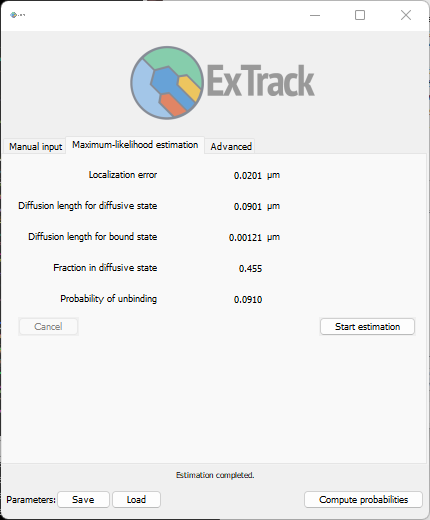
大家的价值观应该接近,但不一定必须。
我们确实发现,束缚态的扩散长度比其他态的扩散长度更小。
您可以使用窗口左下角的Save按钮将参数保存到JSon文件中。
将生成一个简单的文本文件,如下所示:
{
  "localizationError": 0.020066601029511685,
  "diffusionLength0": 0.09013966560752623,
  "diffusionLength1": 0.0012129577182051934,
  "F0": 0.45455903522933716,
  "probabilityOfUnbinding": 0.09100120643275995,
  "nbSubteps": 2,
  "nFrames": 5
}
您可以稍后使用Load按钮重新加载。
现在最困难的部分已经完成了。
您可以使用这些参数让 ExTrack 估计某种状态或另一种状态的概率。
单击右下角的Compute probabilities按钮即可执行此操作。
这个计算应该相对比较快。
计算结束后,将会有新的数字特征主体到 TrackMate 会话。
例如,如果您返回 TrackMate 主窗口,然后单击_显示选项_面板中的Spots按钮,您将在这些点上出现两个新的数字特征:P 卡住 和 P 扩散:
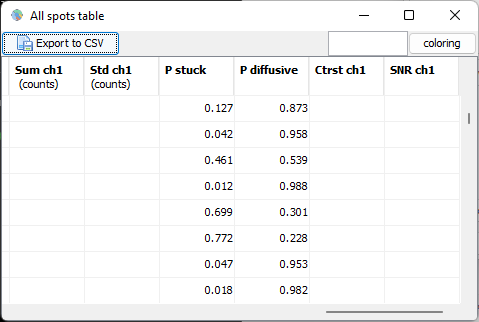
这些数值可用于在 TrackMate 中生成当前状态的可视化结果。
在同一个 TrackMate 面板中的_点颜色选择_中,选择_点功能_类别下的Probability diffusive。
对“轨道颜色”设置执行相同的操作。
单击中间和顶部旁边的两个 auto 按钮可将显示范围自动设置为 0 到 1。
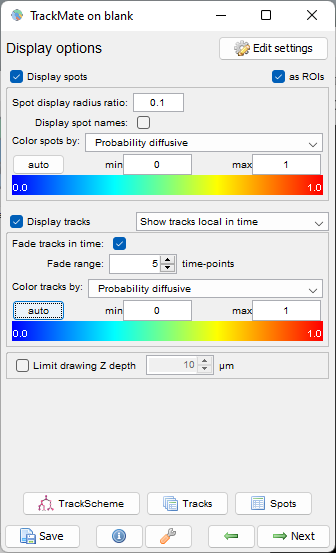
颜色反应在轨道显示上:
我们可以看到粒子从一种状态转变为另一种状态。 在这个模拟数据集上,状态概率与抽样的表观判断给出了直觉很好地对应。
注:
州的意义可以颠倒。
根据初始参数和估计,被称为 diffusive 的状态实际上可能代表卡住状态。
我们选择了一个规定,其中状态名称是明确的,但最终,第一个状态是扩散状态还是束缚状态由扩散长度的值决定。
编写 TrackMate-ExTrack 脚本。
与大多数 TrackMate 生态系统一样,ExTrack 可以使用 Jython 编写的脚本。 这是一个示例脚本:
import os
import time

from java.io import File

from fiji.plugin.trackmate.io import TmXmlReader

from fr.pasteur.iah.extrack import ExTrack
from fr.pasteur.iah.extrack.compute import ExTrackParameters


def process( path ):

        # Load tracks.
        print( "Loading " + path )
        reader =  TmXmlReader(  File( path ) )
        model = reader.getModel()
        if not reader.isReadingOk():
                print( "Problem reading the file:" )
                print( reader.getErrorMessage() )
                print( "Aborting." )
                return

        print( "Loading done." )

        # Create an ExTrack object.
        extrack = ExTrack( model )

        # We only estimate parameters if we do not have them already saved.
        parent = File( path ).getParent()
        savefile = File( parent, "extrack-params.json" )
        if savefile.exists():
                print( "\nFound an existing save-file for parameters. Skipping parameter estimation." )

        else:
                # Estimate motility parameters.
                print( "\nEstimating motility parameters (can be long)..." )
                # Use the default as starting point.
                startpoint = ExTrackParameters.create() \
                                        .localizationError( 0.02 ) \
                                        .diffusionLength0( 0.001 ) \
                                        .diffusionLength1( 0.1 ) \
                                        .F0( 0.5 ) \
                                        .probabilityOfUnbinding( 0.1 ) \
                                        .nbSubSteps( 1 ) \
                                        .nFrames( 6 ) \
                                        .build()
                print( "Using the following as starting point:" )
                print( startpoint.toString() );

                start = time.time()
                optimum = extrack.estimateParameters( startpoint )
                end = time.time()
                print( "Estimation done in %.1f seconds.\nFound the following optimum:" % ( end - start ) )
                print( optimum.toString() )

                # Save.
                print( "\nSaving the parameters to a JSon file." );
                ExTrack.saveParameters( optimum, savefile.getAbsolutePath() )
                print( "Saved to " + savefile.getAbsolutePath() )

        # Load.
        print( "\nLoading the parameters from a JSon file." )
        loadedparams = ExTrack.loadParameters( savefile.getAbsolutePath() );
        print( "Loaded from " + savefile.getAbsolutePath() )
        print( "Parameters loaded:" )
        print( loadedparams )

        # Predict probabilities.
        print( "\nPredicting diffusive & stuck probabilities..." )
        extrack.computeProbabilities( loadedparams )
        print( "Done." )

        # Print probabilities.
        print( "\nContent of model features now:" )
        print( "-----------------------------------------------------------------" )
        print(  "| %-25s | %-15s | %-15s |" % ( "", "P stuck", "P diffusive" ) )
        print( "-----------------------------------------------------------------" )
        allspots = model.getSpots()
        frames = allspots.keySet()
        for frame in frames:
                print( "Frame " + str( frame ) + ":" )
                spots = allspots.iterable( frame, True )

                for spot in spots:
                        print( "| %-25s | %-15.3g | %-15.3g |" % ( spot.getName(), spot.getFeature( "EXTRACK_P_STUCK" ), spot.getFeature( "EXTRACK_P_DIFFUSIVE" ) ) )
                        break # Remove to get all spots.
                print( "-----------------------------------------------------------------" )
                break # Remove to get all frames.


if __name__ == "__main__":
        print( 'Current working dir: %s' % os.getcwd() )
        # Path to the TrackMate file containing your tracks.
        path = "scripts/samples/tracks.xml"
        process( path )
您需要修改第 95 行,使 path 标记指向 TrackMate XML 文件。
以下是使用我们在上面教程中使用的相同模拟数据集的脚本的剧本:
Started ExTrackScritExample.py at Wed Jul 20 10:53:09 CEST 2022
Current working dir: C:\Users\tinevez\Development\Fiji.app
Loading /Users/tinevez/Development/TrackMateWS/TrackMate-ExTrack/samples/simulated_tracks.xml
Started ExTrackScritExample.py at Wed Jul 20 10:54:40 CEST 2022
Current working dir: C:\Users\tinevez\Development\Fiji.app
Loading /Users/tinevez/Development/TrackMateWS/TrackMate-ExTrack/samples/simulated-tracks.xml
Loading done.

Estimating motility parameters (can be long)...
Using the following as starting point:
fr.pasteur.iah.extrack.compute.ExTrackParameters@132517e5
 - Localization error                   : 0.0200
 - Diffusion length for diffusive state : 0.00100
 - Diffusion length for bound state     : 0.100
 - Fraction in diffusive state          : 0.500
 - Probability of unbinding             : 0.100
 - Number of sub-steps for optimization : 1
 - Number of frames for optimization    : 6

Estimation done in 27.8 seconds.
Found the following optimum:
fr.pasteur.iah.extrack.compute.ExTrackParameters@56c79383
 - Localization error                   : 0.0201
 - Diffusion length for diffusive state : 0.00139
 - Diffusion length for bound state     : 0.0908
 - Fraction in diffusive state          : 0.555
 - Probability of unbinding             : 0.0744
 - Number of sub-steps for optimization : 1
 - Number of frames for optimization    : 6


Saving the parameters to a JSon file.
Saved to C:\Users\tinevez\Development\TrackMateWS\TrackMate-ExTrack\samples\extrack-params.json

Loading the parameters from a JSon file.
Loaded from C:\Users\tinevez\Development\TrackMateWS\TrackMate-ExTrack\samples\extrack-params.json
Parameters loaded:
fr.pasteur.iah.extrack.compute.ExTrackParameters@14de5359
 - Localization error                   : 0.0201
 - Diffusion length for diffusive state : 0.00139
 - Diffusion length for bound state     : 0.0908
 - Fraction in diffusive state          : 0.555
 - Probability of unbinding             : 0.0744
 - Number of sub-steps for optimization : 1
 - Number of frames for optimization    : 6


Predicting diffusive & stuck probabilities...
Done.

Content of model features now:
-----------------------------------------------------------------
|                           | P stuck         | P diffusive     |
-----------------------------------------------------------------
Frame 0:
| ID0                       | 0.872           | 0.128           |
-----------------------------------------------------------------
JYT,2022年7月
