
ImageJ 文档 Wiki 不再位于 <https://imagejdocu.tudor.lu>, 位置,因为五年前 CRP Henri Tudor 已合并成为卢森堡科学技术研究所,旧域名将终止。我们希望以此为契机将 <https://imagejdocu.list.lu> 上的资源与 <https://imagej.net>. 上的资源合并
本指南介绍了将页面从 ImageJ 文档 Wiki (DokuWiki) 迁移到此 ImageJ wiki (GitHub Pages+Jekyll+Markdown+Liquid) 的过程。
-
创建 GitHub 帐户(如果您还没有帐户),请访问 signup page。
-
确定您要迁移的 ImageJ 文档 Wiki 页面。 在本演练中,我们将选择 Colocalization Finder 页面。
-
通过在地址栏中选择页面路径并将其复制到剪贴板来获取页面路径。在这里,这是
plugin/analysis/colocalizationfinder/start。 -
获取转换后的 Markdown 文本。 我们已将 wiki 标记从 DokuWiki 格式初步转换为 Markdown 格式,并为您将其放在网上。在
https://raw.githubusercontent.com/imagej/imagejdocu/master/[your-page].md中找到转换后的页面,将[your-page]替换为上一步中的代码片段。对于 Colocalization Finder,URL 为https://raw.githubusercontent.com/imagej/imagejdocu/master/plugin/analysis/colocalizationfinder/start.md。将整个标记代码复制到剪贴板。 - 在 GitHub 上,创建目标 ImageJ wiki 页面。 在 ImageJ wiki 上,页面名称采用小写字母并带有破折号分隔符。因此,对于迁移后的 Colocalization Finder 页面,我们希望它显示在
https://imagej.net/plugins/colocalization-finder处。所以:- Navigate to https://github.com/imagej/imagej.github.io/ in your web browser.
- Click into the
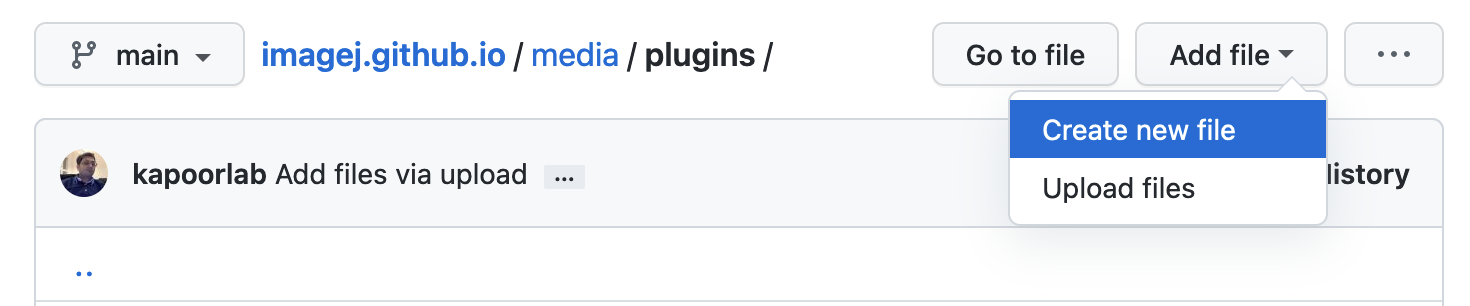
mediafolder, then (scrolling down the page)plugins. - On the top right side, click the button, then “Create new file”:
- For “Name your file…”, type
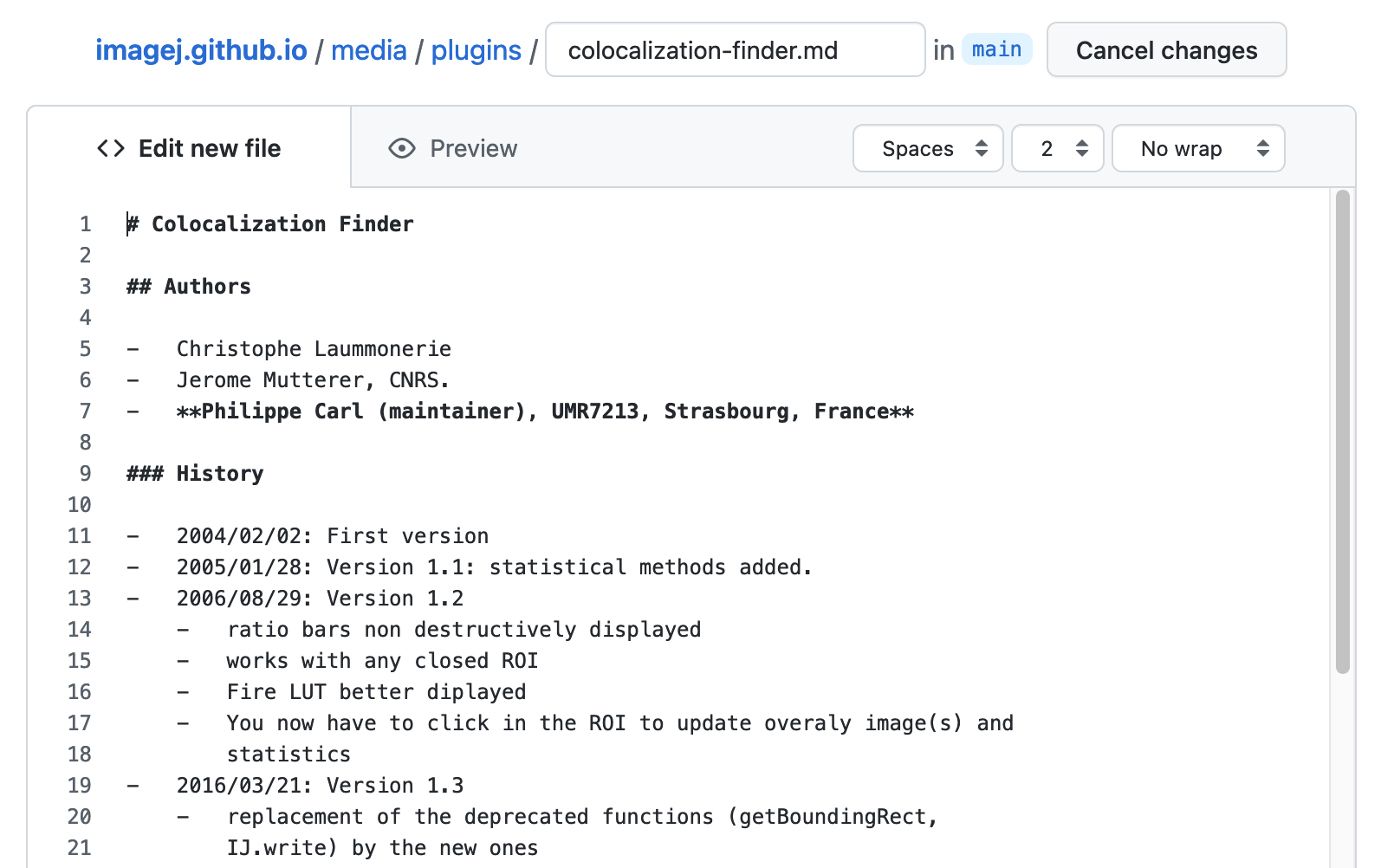
colocalization-finder.md.
- 将转换后的 Markdown 代码粘贴到“编辑新文件”选项卡的空白文本区域中:
-
预览结果。 单击“预览”选项卡可预览页面的外观。
- 迁移所需镜像:
- Right-click and “Save Image As…” the images from your page on the ImageJ Documentation Wiki. For Colocalization Finder, there are two images:
cf_images.pngandcf_table.png. - Rename the images to use dashes instead of underscores, as per the wiki’s lower-web-case naming convention. For the Colocalization Finder images, their new names will be
cf-images.pngandcf-table.png. - In a separate browser tab:
- Go to https://github.com/imagej/imagej.github.io again.
- Click into
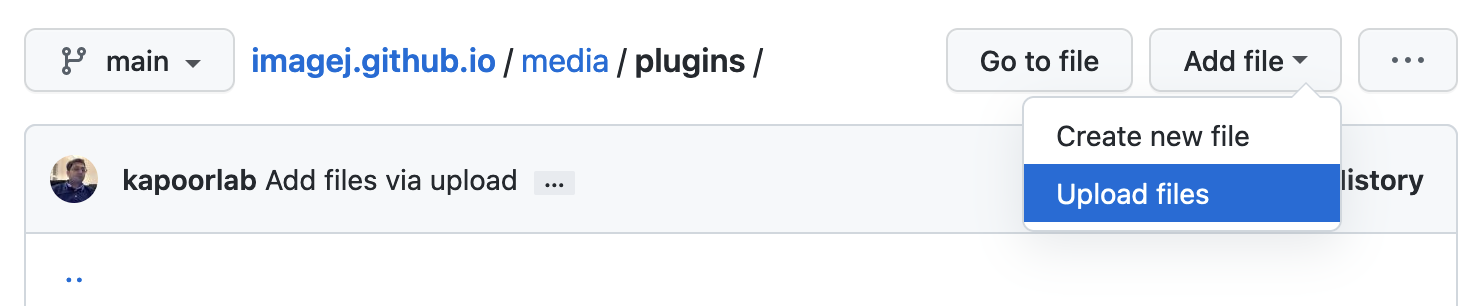
mediathenpluginsagain. - Click the button, then “Upload files”:
- Drag
cf-images.pngandcf-table.pngonto the “Drag files here” area. Then scroll down to the “Commit changes” box below, type a message like “Add Colocalization Finder images”, then click the button. This will stage the images for availability from URLshttps://imagej.net/media/plugins/cf-images.pngandhttps://imagej.net/media/plugins/cf-table.pngrespectively.
- Back in our new Colocalization Finder page, we fix the image link paths; e.g.:
becomes
See the wiki editing guide’s images page for details on formatting your images.
- If you are new to GitHub and not yet approved as an imagej.net editor, you will need to file a pull request, which is just a term meaning your changes will be posted as a suggestion (i.e. a “request”) for the wiki editors to review, approve, and merge (i.e. “pull in”) to the main wiki contents. When you commit your changes as described in step 8.3 above, GitHub will walk you through this procedure. Once your first pull request is merged, you will be granted direct edit access to simplify future edits.
- Right-click and “Save Image As…” the images from your page on the ImageJ Documentation Wiki. For Colocalization Finder, there are two images:
-
向您的页面添加类别,以便正确分类。共定位查找器页面位于
plugins/analysis子树中,因此我们将category: [Colocalization, Analysis]添加到前面的内容中(即作为顶部---行之间的键/值对)。请参阅第 List of Extensions 页面,展开类别过滤器,以获取 imagej.net 上正在使用的类别的完整列表。 - 修复任何剩余的错误和缺陷。 检查呈现的页面,记录任何问题。然后向下滚动到页面下方,找到包含 wiki 标记代码的文本框。
- For example, the Colocalization Finder auto-converted markup has a spurious
<!-- -->block surrounded by code fences, which should be deleted. - Test every hyperlink, and update the ones that don’t work. Old
http:links should be converted tohttps:when possible. - You may wish to add a statbox for your plugin:
- If your plugin is published to maven.scijava.org, you can add an
artifact:to the front matter, and the statbox will be autopopulated. (Example) - If not, but you use Maven to build and have a
pom.xml, you can link to the raw POM withpom-url:in the front matter, and the statbox will be autopopulated. (Example) - Or if not, you can enter your plugin statistics manually field by field. (Example) See the statbox guide for details.
- If your plugin is published to maven.scijava.org, you can add an
- See the wiki editing guide for additional information on wiki syntax.
- For example, the Colocalization Finder auto-converted markup has a spurious
-
再次预览您的页面,根据需要多次预览,直到一切看起来都不错。某些功能(包括 Liquid
{% ... %}标签和 Front Matter 值)不可预览,但会在页面实际呈现在 imagej.net 上时生效。 - 完成后提交更改。 正如我们对图像所做的那样,向下滚动到“提交新文件”区域,以祈使时态输入提交消息,例如“添加共本地化查找器插件”,然后单击“提交新文件”继续。如果您有编辑权限,您的更改将立即合并,并在 10 分钟内显示在 imagej.net 上。或者,如果您是新手,系统将引导您提交更新的拉取请求。
如有任何问题,请写信给Image.sc Forum!我们很乐意提供帮助。
