


本节内容已经过时,可能具有误导性或无效。请谨慎对待这里的任何说明。如有疑问,请向社区求助。

Please make sure that you have a clean build of the plugin you try to upload. You can ensure a clean build by calling the Fiji Build System with the -clean suffix before building the actual target. Example:
./Build.sh plugins/Fiji_Plugins.jar-clean
./Build.sh plugins/Fiji_Plugins.jar
图形化方式(推荐)
您可以使用Fiji Updater上传新插件(或其新版本)。首先开始Help › Update Fiji。它会告诉你有本地修改的文件:
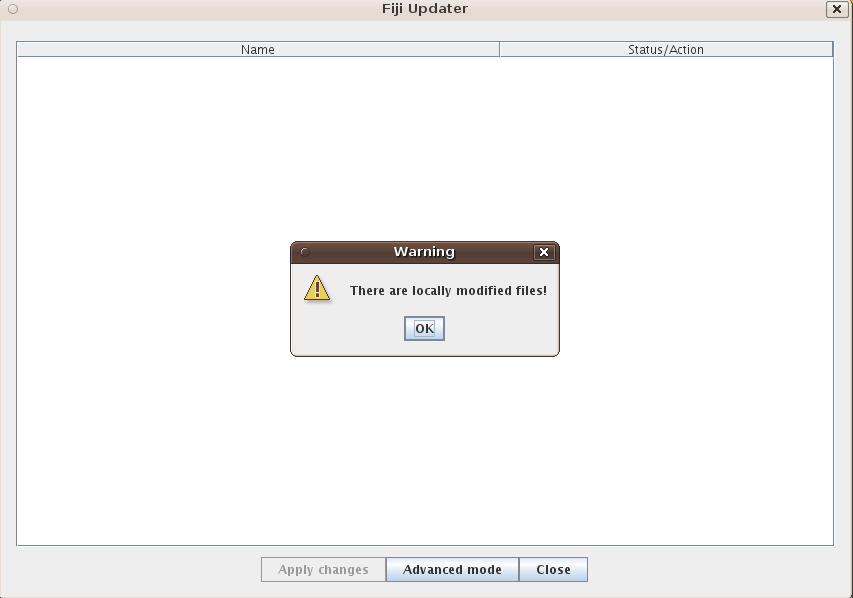
Please make sure that there are no updateable files, lest you overwrite new versions with old ones. If that is the case, the Updater will automatically switch to the Advanced Mode and show you the locally modified files. By clicking on the Locally modified, you can choose to upload one or more files:
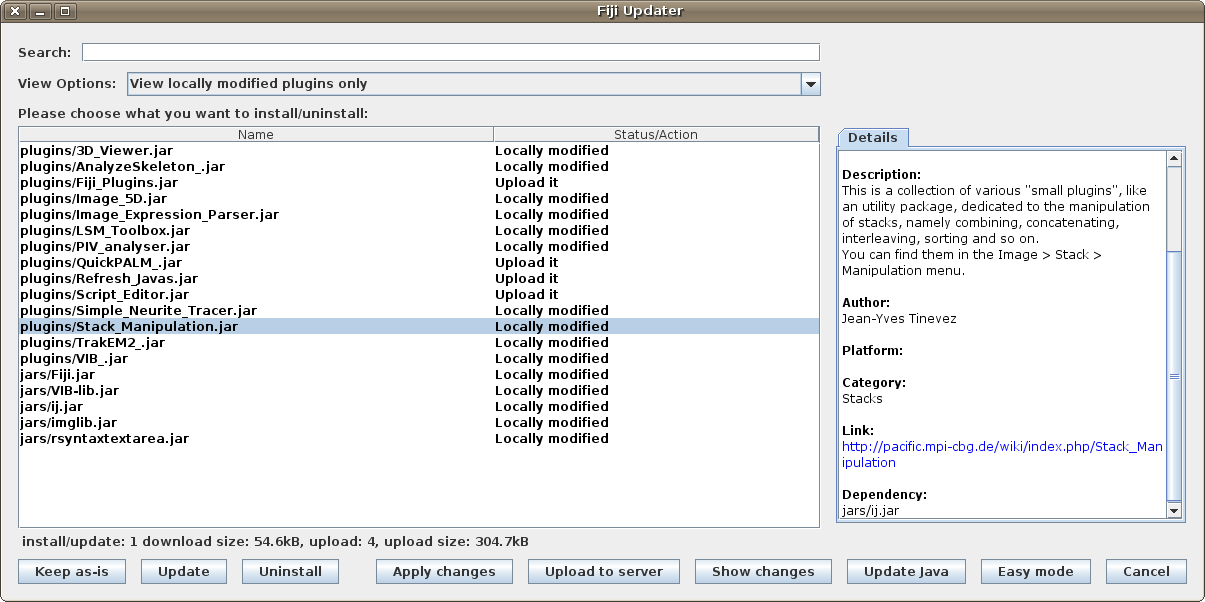
If you want to upload a new file, i.e. a file Fiji does not know anything about yet, you have to switch to Advanced Mode yourself and select the view option View non-Fiji plugins only.
Please make sure that the information in the Details is correct; you can edit it by clicking into the text and modifying it in-place.
Please make sure also that the files you are about to upload are clean. You should also use the Show changes button for an extra check – in the top part, you will see information about changed and local-only/remote-only contents of the .jar file.
Once everything is ready for upload, just click the button Upload to Server.
You will need to have an account on fiji.sc which is in the group updaters, and you will only be offered the upload option by the Updater if you work from a working directory with source files.
内部结构
最初的Fiji Updater非常有限;它只允许下载文件的新版本,并且没有选项来确定先前是否通过更新程序安装了本地版本。
然而,它已经为当前的更新程序做好了准备,因为许多人很乐意使用旧的更新程序。
这些是斐济更新程序的构建块:
校验和
文件版本由文件内容的加密散列以及可能的文件名来标识。
应用两种不同的方法:一种用于 .jar 文件,另一种用于所有其他文件。对于常规文件,文件名(不带尾随 NUL 或换行符)和确切的文件内容将通过管道传输到 SHA-1 算法中。对于 .jar 文件,第 条目的文件名以及这些文件的确切内容将通过 SHA-1 算法依次推送。
.jar 文件之所以不同,是因为它们实际上只不过是美化的 .zip 文件,因此包含时间戳。如果这些时间戳不同,则 .zip 文件也会不同。因此,如果开发人员 Anne Berlin 在芝加哥编译一些插件,而开发人员 Dario Espana 在斐济编译相同的插件,则时间戳可能不同,因此 .jar 文件不同,即使它们包含相同的 *.class 文件!
数据库
最初,数据库存储在文件current.txt中,该文件存储在fiji.sc网络服务器的update/目录中。它的格式只是表格中的行
<filename> <timestamp> <checksum>
当文件的校验和与本地校验和不一致并且本地文件的时间戳早于current.txt中的时间戳时,文件被认为是可更新的。
旧的更新程序除了 Fiji 启动器、plugins/、misc/、retro/ 和 jars/ 目录中的 ij.jar 和 .jar 文件之外,从未用于其他任何用途,因此它甚至不会发现它安装了 .py 文件,并愉快地提供更新再次。因此,current.txt 不得包含除符合所述期望的文件之外的任何其他内容。
新数据库存储在文件 db.xml.gz 中,该文件又是一个静态文件。但是,正如其名称所示,它遵循可扩展的 XML 模式。
该数据库不仅存储与current.txt相同的信息,它可以包含任意文件名(甚至包括空格,这在以前的数据库中是不可能的),存储文件的描述,具有有关平台、类别的信息,最重要的是,它具有所有已知的先前版本的校验和,以便我们最终决定更新文件是否安全或是否在本地修改,并且用户应该明确声明更新是安全的。
文件组织
不同的文件类型存储在 ImageJ/Fiji 安装中的不同位置,由更新程序获取(有关技术详细信息,请参阅source code):
 jars/
 retro/
 misc/
   .jar
   .class

 plugins/ (and subfolders)
   .jar
   .class
   .txt
   .ijm
   .py
   .rb
   .clj
   .js
   .bsh
   .groovy
   .gvy

 scripts/
   .py
   .rb
   .clj
   .js
   .bsh
   .m
   .groovy
   .gvy

 macros/
   .txt
   .ijm

 luts/
   .lut

 images/
   .png
   .tif
   .txt

 Contents/
   .icns
   .plist

 lib/
 mm/
 mmautofocus/
 mmplugins/
   (all files)
更新程序只会根据其功能选取存储在适当位置的文件。此外,./lib/文件夹包含特定于平台的子目录,以允许加载依赖于平台的本机库:
 lib/
   linux32/
   linux64/
   macosx/
   win32/
   win64/
更多信息参见本thread on fiji-devel
实际文件
与数据库条目相对应的文件也存储为以下形式的平面文件
<relative path>-<timestamp>
与数据库位于同一目录中。 相对路径是指Fiji目录内的路径,例如plugins/Fiji_Updater.jar。
